Inside StegoAd: How We Disrupted a Massive Malicious Extension Campaign
119 extensions, up to 2.6 million installs, delayed execution, and payloads hidden inside image and font files. Here’s what we found, how we disrupted it, and how we’re protecting you.
Browser extensions make every day browsing better — blocking ads, translating pages, and downloading videos. Millions of people trust them. But what happens when that trust is exploited?
Through proactive threat hunting, our team identified and disrupted one of the most sophisticated malicious extension campaigns we’ve encountered. We call it StegoAd — named for its signature technique of hiding malicious code inside innocent-looking image files (steganography) combined with ad fraud (adware).
The threat actor operated 119 malicious extensions with a combined install base of up to 2.6 million users. Not every installation led to payload execution — the actor’s own evasion logic (time-gates, probabilistic execution, server-side validation) meant payloads did not fire for every user. Our data indicates this actor has been active since at least 2021, continuously evolving techniques to evade detection. All identified extensions have been removed, and associated developer accounts suspended.
Threat Campaign Overview
Imagine downloading an ad blocker from a trusted store. It works perfectly — your ads disappear; you leave a positive review. But three days later, without any visible change, that extension quietly fetches an innocent-looking PNG image from either a package or a remote server. Hidden inside that image — invisible to any viewer or scanner — is executable code. Your browser decodes and runs it. Now the attacker has a backdoor.
That’s StegoAd. The actor impersonated trusted categories — ad blockers, VPNs, translators, and video downloaders — across 90+ disposable developer accounts. Every extension delivers genuine functionality to earn reviews. The malicious payload activated only after passing multiple gates: days of dormancy, probabilistic execution, and server-side validation.
Why we attribute this to a single threat actor
Attributing 119 extensions across 90+ developer accounts to a single threat actor required multiple converging signals:
- Shared infrastructure — All extensions connect to the same set of C2 domains using identical URL path patterns
- Code fingerprints — Identical hashing algorithms and unique debug strings persist across all variants, regardless of obfuscation technique
- Operational behavior — Rapid account recreation after suspensions, and multiple extensions all mapping to the same backend infrastructure
- Same monetization IDs — One AdSense publisher ID and the same Google Analytics properties appear across extensions from seemingly unrelated developers
- Developer metadata — Multiple accounts share similar registration patterns and reuse the same developer details across extensions
How the attack works
StegoAd used a five-stage attack chain designed to reduce visibility during analysis and delay malicious execution until post-installation conditions were met.
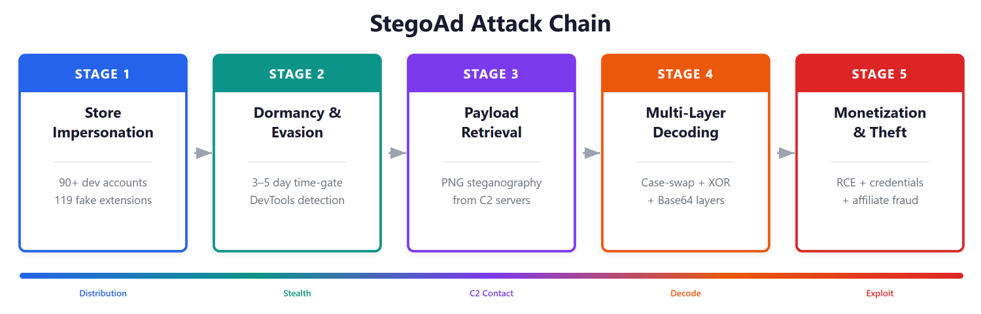 Figure 1: StegoAd 5-stage attack chain — from store impersonation to credential theft and monetization, mapped to MITRE ATT&CK
- Store impersonation — The actor publishes extensions mimicking popular tools. Each provides real functionality to earn reviews and avoid suspicion.
- Dormancy & evasion — A 3–5 day time-gate ensures the extension stays silent during sandbox analysis. It even detects if DevTools is open and hides indefinitely.
- Hidden payload retrieval — The extension fetches a normal-looking PNG image from a static package or C2 server. The server validates the request — researchers probing directly get empty responses.
- Multi-layer decoding — The hidden payload is decoded through case-swaps, digit-swaps, Base64, and XOR transformations — then validated against a signature before execution.
- Monetization & theft — The full attack suite activates: credential theft, RCE backdoor, affiliate hijacking, ad replacement, and covert telemetry.
Why this campaign matters beyond ad fraud
The campaign directly impacted users by injecting unauthorized ads on web pages, hijacking affiliate commissions on shopping sites like Amazon, eBay, and AliExpress, and redirecting search results — generating revenue at the user’s expense while degrading their browsing experience. Beyond this ad fraud, our dynamic analysis of retrieved payloads revealed far more serious capabilities: credential theft targeting Google and WordPress accounts, cookie collection, and a remote code execution backdoor that could deliver additional malicious functionality after installation. The underlying infrastructure and multi-layered concealment methods allowed the campaign to persist and adapt over time.
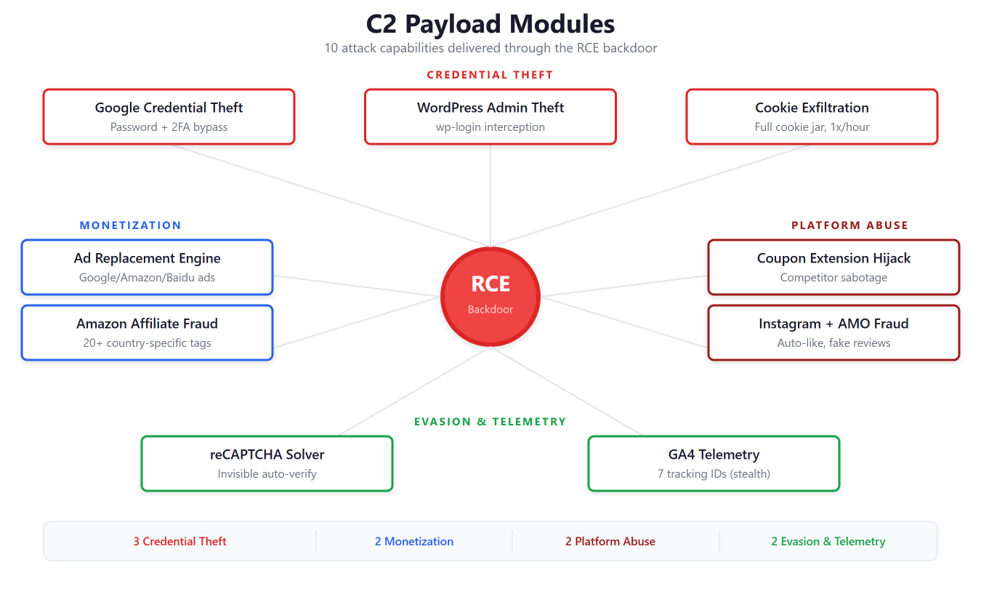 Figure 2: 10 attack modules delivered through the RCE backdoor — from credential theft to competitor sabotage
Key risks observed in the retrieved payloads included:
Credential and session theft: The payload intercepted Google credentials and second-factor codes during sign-in, and exfiltrated browser cookies at a controlled rate — enabling account takeover through both stolen passwords and hijacked sessions.
Affiliate hijacking: The campaign targeted competing extensions to redirect affiliate credit.
Additional code delivery: The command-and-control infrastructure could deliver additional code after installation, expanding post-installation capability and maintaining persistent access to the victim’s browser.
WordPress credential harvesting: The campaign collected WordPress administrator credentials and used traffic-ranking references to prioritize targets.
Google Analytics as covert telemetry: Seven GA tracking IDs appear to have been used to monitor campaign activity at scale through trusted third-party infrastructure.
A sophisticated infrastructure
StegoAd operates across 10+ command-and-control domains organized by function, including payload delivery, credential exfiltration, proxy relays, and telemetry.
The infrastructure features automatic failover, Cloudflare Workers proxying, and GitHub Pages abuse for hosting telemetry beacons and reCAPTCHA gates. Those delivery mechanisms were closely tied to the campaign’s use of concealed payload formats, described in the next section.
How steganography hides malware in plain sight
The defining technique of StegoAd is steganography — hiding executable code inside files that look completely normal. Over the campaign’s lifetime, the actor progressed through four techniques:
- PNG icon steganography: JavaScript appended after the IEND marker of the extension’s own icon file. The image renders normally everywhere.
- External PNG from C2: A PNG fetched from remote servers contains encoded payload — impossible to detect through static analysis.
- WebP containers: After PNG-specific detections improved, the actor shifted to WebP — a format where existing detection rules had not yet been adapted to identify embedded payloads.
- Unicode/font encoding: Evolving beyond image files, the actor also hid payload characters within WOFF2 font files bundled with the extension — appearing as legitimate font data to scanners
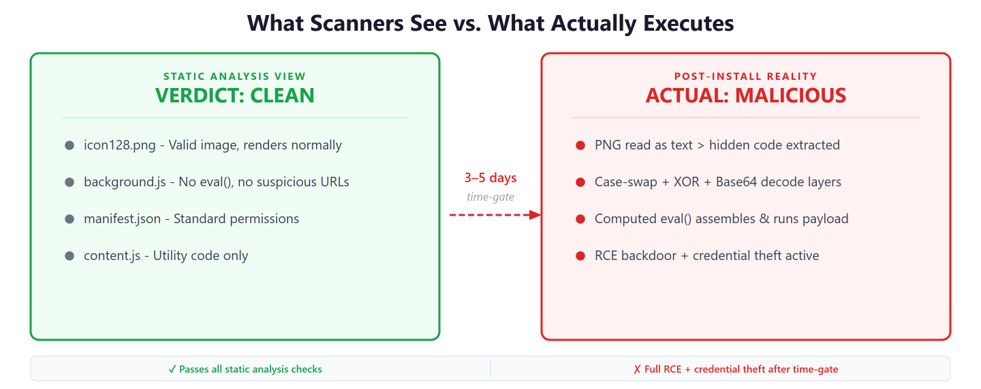 Figure 3: What static scanners see vs. what actually executes — the same extension passes all analysis yet hides malicious behavior
An actor that keeps adapting (Campaign Evolution)
As Microsoft detections and enforcement actions progressed, the actor adjusted encryption, rotated infrastructure, migrated from Manifest V2 to V3, and changed steganographic formats. These changes illustrate how the campaign evolved over more than two years and provide context for the response and protections described next.
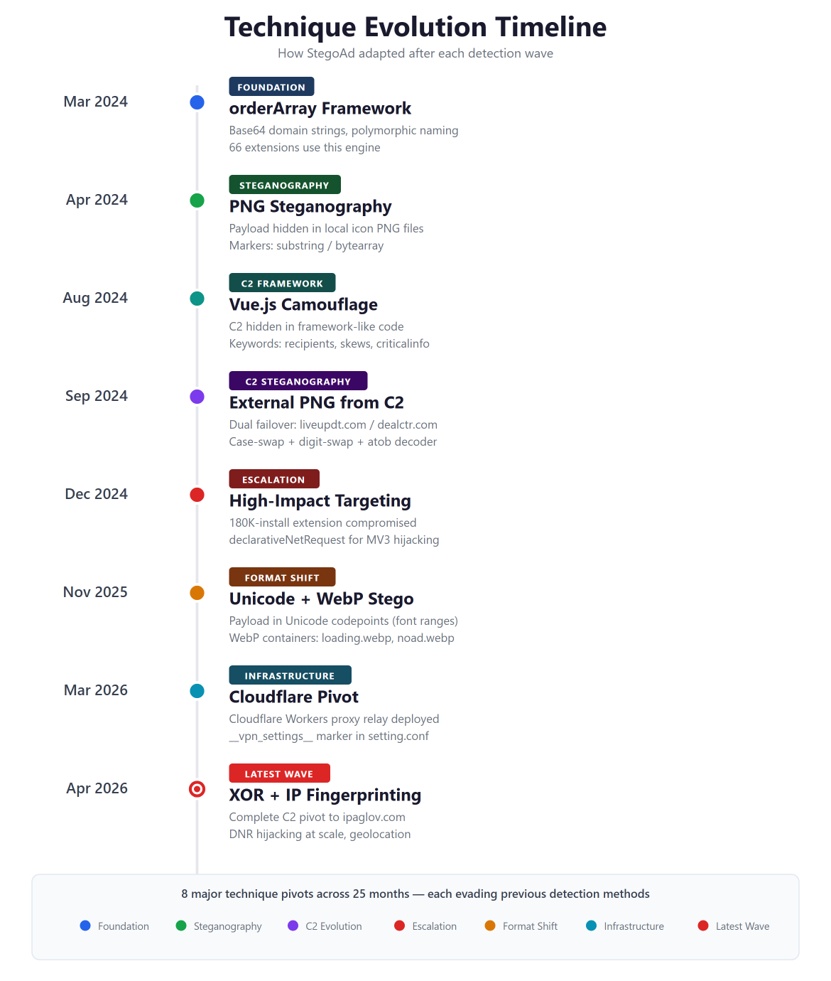 Figure 4: StegoAd technique evolution timeline — the actor adapted after each detection wave
Microsoft Response and Protection
The scale of this campaign was significant: 119 malicious extensions across 90+ developer accounts, with a combined install base of up to 2.6 million users potentially affected. The actor operated 10+ C2 domains with automatic failover, used 15+ polymorphic naming variants to defeat pattern-based detection, and ran 20+ country-specific affiliate fraud schemes — active since at least 2021.
Here’s what we did:
- Removed all 119 identified malicious extensions from the Microsoft Edge Add-ons store.
- Suspended 90+ developer accounts across 90+ identities.
- Deployed new detection capabilities including dynamic C2 response analysis and steganographic payload scanning.
- Updated our continuous monitoring to detect polymorphic framework patterns, regardless of variable naming.
- Published comprehensive IOCs to enable cross-platform defense (Chrome, Firefox, and other Chromium browsers).
Our store protections combine automated static and dynamic analysis with human review and continuous threat hunting. The sophistication of StegoAd’s evasion — steganography, time-delayed execution, DevTools detection, and server-side request validation — required novel detection approaches. When new threat patterns emerge, detection is updated in near real-time and previously published extensions are re-evaluated retroactively. Every campaign we investigate directly strengthens protections for the entire ecosystem.
Are you affected?
To check if you had any of the malicious extensions installed:
- Open edge://extensions in your browser.
- Compare your installed extension IDs against the full list in the attached technical report (Section 11.1, 119 extension IDs).
- If any match, or if you previously had an extension that was automatically removed, you were likely affected.
Recommendations for end users
Whether or not you were affected by StegoAd, these practices help protect you from malicious extensions:
- Choose verified publishers: Look for publishers with established track records and positive reviews. The Edge Add-ons store highlights verified developers to help you identify trusted extensions.
- Review permissions before installing: Check what an extension asks for. A translator shouldn’t need access to your browsing history. Thoughtful permissions are a sign of a well-built extension.
- Keep your extensions up to date: Developers regularly release updates that improve security. Microsoft Edge auto-updates extensions, so keeping your browser current ensures you have the latest protections.
- Audit periodically: Visit edge://extensions from time to time and remove extensions you no longer use or don’t recognize. A tidy extension list is easier to manage.
- Watch for unexpected changes: If you notice unusual redirects, unfamiliar ads, or performance changes after installing an extension, report it through the Edge Add-ons store and consider removing it.
- Change passwords if concerned: If you believe a malicious extension was installed, update your passwords for sensitive accounts (Google, banking, WordPress) and review sign-in activity.
- Use strong authentication: Enable two-factor authentication on important accounts. Hardware security keys (FIDO2) provide the strongest protection against credential theft.
- Keep Microsoft Edge updated: Edge’s built-in protections — including SmartScreen and extension safety checks — continuously improve with each update.
Recommendations for extension developers
Legitimate extension developers play a critical role in maintaining ecosystem trust. These practices help distinguish your extensions from malicious actors:
- Request only necessary permissions: Use the minimum permissions your extension needs. Leverage optional_permissions for features users may not always enable — this builds trust and speeds up review.
- Keep code readable: Avoid obfuscation. Include source maps where possible. Clear, readable code demonstrates transparency and accelerates the review process.
- Avoid executing remote code: Fetch data (JSON, configs) from servers, but keep executable logic within your extension package. This is a key trust signal reviewers look for.
- Establish a strong developer identity: Use a verified, consistent developer account with a clear privacy policy and support contact. Users and reviewers trust established identities.
- Report impersonation: If you find extensions impersonating your brand, report them through the Microsoft Edge Add-ons feedback form. We act quickly on verified reports.
Full technical report
This blog provides an accessible overview of the StegoAd campaign. For the complete technical analysis — including code-level evidence, steganographic decode flows, polymorphic framework internals, all 10 C2 payload modules with code samples, MITRE ATT&CK mapping, and the complete IOC list (119 extension IDs, 10+ C2 domains, 30+ URL patterns, 15+ localStorage keys, and code signatures) — please refer to the report.
Our commitment
The StegoAd campaign demonstrates that browser extensions remain a potent and evolving attack surface. Through continuous monitoring and proactive threat hunting, our team identified this campaign’s sophisticated evasion techniques — including steganography, multi-layer encoding, and server-side gating — and took swift action to protect users. We remain committed to earlier detection, rapid disruption, and sharing intelligence so the broader security community can defend across all platforms.
We will continue to monitor for new StegoAd activity and will update this post with new indicators as they are discovered. The threat actor remains active — vigilance is ongoing.