Reducing the Opportunity for Exploitation with Edge Lockdown Mode
In a previous blog post, I discussed how artificial intelligence is changing the economics of vulnerability discovery and exploitation. In that post, I shared threat intelligence from Microsoft and its partners showing attackers targeting Edge and Chrome users by weaponising known vulnerabilities disclosed in Chromium’s open-source code.
In Edge we are adopting a multi-pronged defensive strategy to tackle these threat actors:
- We are improving how Edge delivers security updates, including the new ‘Update on Idle’ feature now available in all channels.
- We are hardening the core browser by rewriting core parts of Edge and Chromium in Rust.
- We are reducing the attack surface that the browser exposes by implementing new process restrictions or Sandboxes and allowing customers to disable optional functionality, the primary focus of the remainder of this post
Traditionally browser vendors have relied on finding and fixing bugs, then getting them to customers faster than the bad guys can exploit them. But faster updates alone cannot eliminate every opportunity for exploitation: a known vulnerability remains exposed until the fix reaches users, while undiscovered vulnerabilities have no patch at all. That’s why we also invest heavily in making essential code safer and limiting what attack surface compromised code can reach.
Enhanced Security Mode for Edge allowed customers to disable the most frequently attacked capabilities – namely V8’s just-in-time (JIT) compiler. We’re now taking the next step by building on ESM to deliver Edge Lockdown mode. These new configuration options further reduce browser attack surface by only allowing selected capabilities on bypassed sites while also strengthening the boundaries around the entire browser.
Apple first coined the name “Lockdown Mode” and we believe that it sets the right end user expectation. Lockdown Mode is designed for users who are at particular risk of being targeted in cybersecurity campaigns. This may include journalists, executives, security researchers, and administrators. Individuals whose threat model justifies accepting reduced compatibility in exchange for stronger protection. It may also apply to devices operating within highly restricted environments. Some websites, especially those with interactive graphics like games or maps may not work as expected with Lockdown mode and require a manual bypass, as such we do not anticipate that this will be used or desirable by most Edge users.
Enhanced Security Mode already changes exploit economics
Edge first announced the experiment that became Enhanced Security Mode (internally called “Super Duper Secure Mode”) on 4th August 2021, challenging the assumption that maximum JavaScript performance should always take priority over security. On 16th February 2022, we announced the general availability of the feature in Microsoft Edge 98. The feature allowed users to choose between balanced or strict mode; balanced mode applies these protections adaptively to unfamiliar sites, while strict mode enables them by default; users and administrators can add exceptions when compatibility requires it.
Our analysis of the known exploited vulnerabilities in Chromium since February 2022 demonstrates that customers who enabled ESM were safe from 55% of them. By disabling JIT compilation, Edge accepts some performance impact while removing a heavily targeted source of vulnerabilities and enabling additional exploit mitigations. JavaScript and WebAssembly continue to run through interpreters. Another benefit of removing dynamic code generation is that Edge can apply stronger operating system protections including ACG and CET which also help mitigate vulnerabilities. More technical detail is available in our original Enhanced Security Mode blog.
Apple adopted the same attack-surface-reduction principle when it announced Lockdown Mode on 6 July 2022. Designed as an optional, extreme protection for people facing highly targeted attacks, it restricts capabilities across the device, including JIT JavaScript compilation in web browsing unless the user excludes a trusted site. Lockdown Mode became available with iOS 16 on 12 September 2022, followed by iPadOS 16 and macOS Ventura on 24 October 2022. Its arrival reinforced the idea behind Enhanced Security Mode: for users at elevated risk, deliberately limiting powerful capabilities can be a worthwhile trade-off for reducing exploitable attack surface.
Why broaden the model beyond JIT
The principle of attack-surface reduction extends well beyond JIT compilation: if a feature or API is unavailable to untrusted web content, an attacker cannot exploit vulnerabilities in the code behind it.
Sophisticated browser attacks often rely on an exploit chain. An attacker may first gain code execution in the renderer through a vulnerability in a component such as V8 or Blink, then exploit a second vulnerability in the operating system kernel or a more privileged browser process, such as the GPU process, to escape the sandbox. With those privileges, the attacker can compromise the device, steal data, or deploy malware such as ransomware. Breaking any link in the chain can prevent the overall attack from succeeding, which is why removing even one reachable component can materially improve security. We have promising work under way to reduce the Windows kernel attack surface, which we will discuss in a future blog.
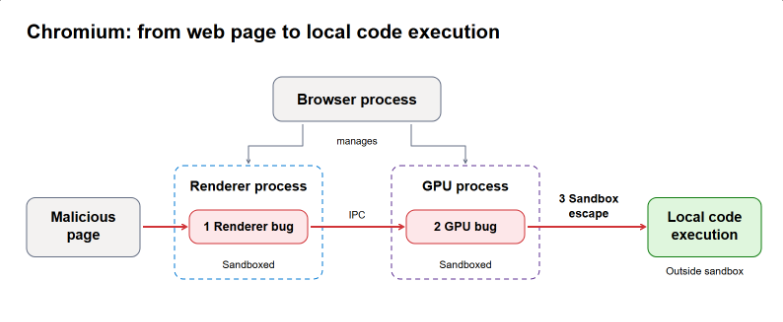
The initial set of Lockdown Mode mitigations focus is the GPU process, a more privileged component that handles complex graphics workloads across browser code, third-party libraries, and device drivers. Web content reaches this stack primarily through WebGL, which provides hardware-accelerated 2D and 3D graphics, and WebGPU, which exposes modern GPU rendering and general-purpose computation; WebNN can also use hardware acceleration for machine-learning workloads. These APIs enable important web experiences, but their implementation complexity has repeatedly been exploited. Google confirmed exploitation of an ANGLE and GPU vulnerability in July 2025 and another ANGLE vulnerability in December 2025, while Chromium security updates continue to address high-severity vulnerabilities in Dawn and WebGPU.
Edge’s current Canary implementation prevents sites from using WebGL, WebGL2, and WebGPU; we expect the full suite to take several releases. Results from this experiment will inform the finished Lockdown Mode experience, including clearer descriptions of restricted capabilities and site-level exceptions that restore trusted sites without weakening protection everywhere else.
As previously mentioned, these protections come with intentional compatibility cost. Games, design tools, maps, visualisations, and other graphics-intensive sites may fail or lose functionality when their GPU interfaces are unavailable. Lockdown Mode is therefore not a default for every user: it is an explicit choice for people whose exposure to targeted attack makes a smaller browser attack surface worth occasional site breakage.
Our analysis of the known exploited vulnerabilities since February 2022 shows that today’s Canary version of Lockdown Mode would have mitigated roughly 60% of all privilege escalation exploits observed in the wild.
Help us test Lockdown Mode
We need help to test Edge Lockdown Mode against real browsing tasks before it is productised more broadly. Security researchers, administrators, developers, and other technically sophisticated users can help us determine whether the protections are effective, the trade-offs are understandable, and trusted sites recover cleanly when an exception is required.
When you encounter a failure, use the “send feedback” option under Settings, Help and Support. Include the task you were attempting, the affected site and capability, whether a narrow exception restored the experience, and whether the protection was clear enough to diagnose. Be sure to mention Lockdown Mode in your report.
How to test Lockdown Mode in Canary
- Update Canary: edge://settings/help. While here, security-conscious users may wish to consider turning on “Update on Idle” see our support article for more information.
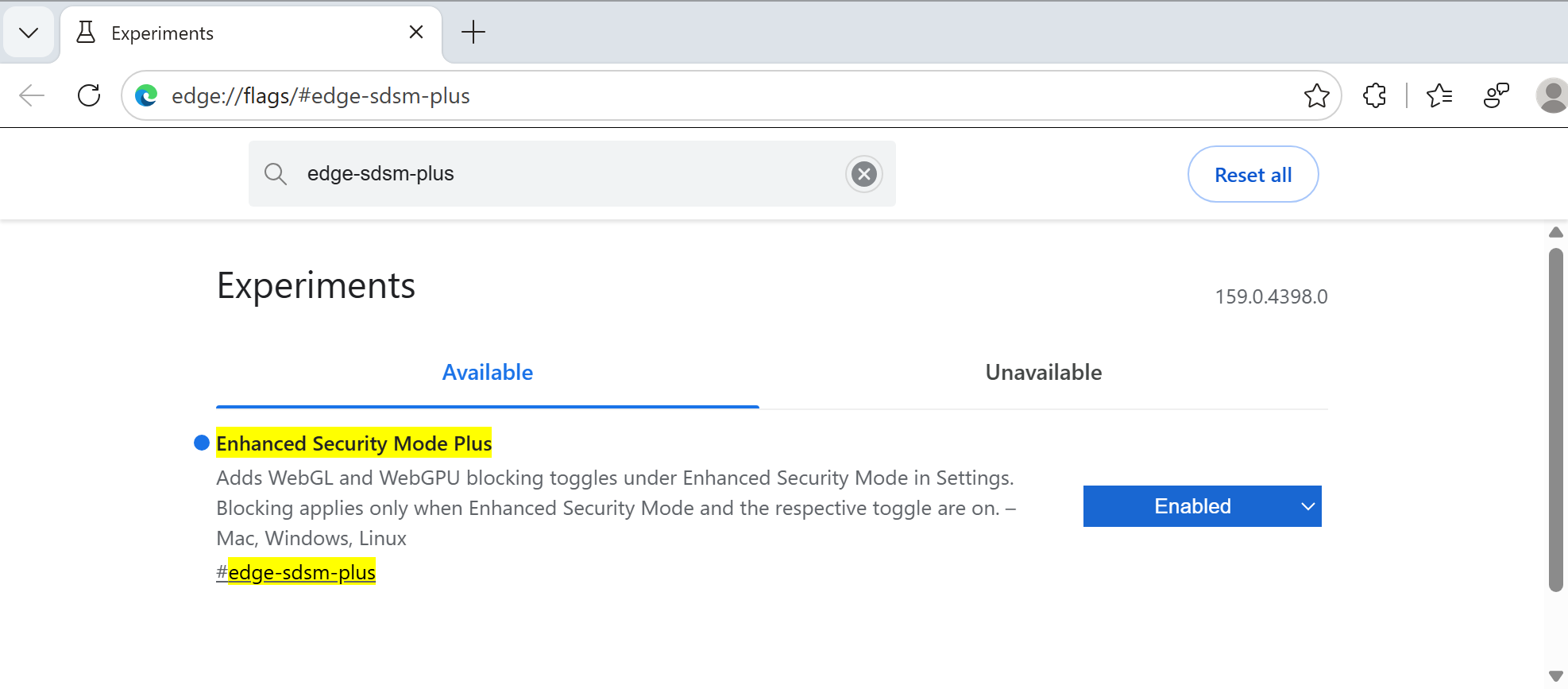
- Enable the flag: edge://flags/#edge-sdsm-plus → Enabled → Restart.
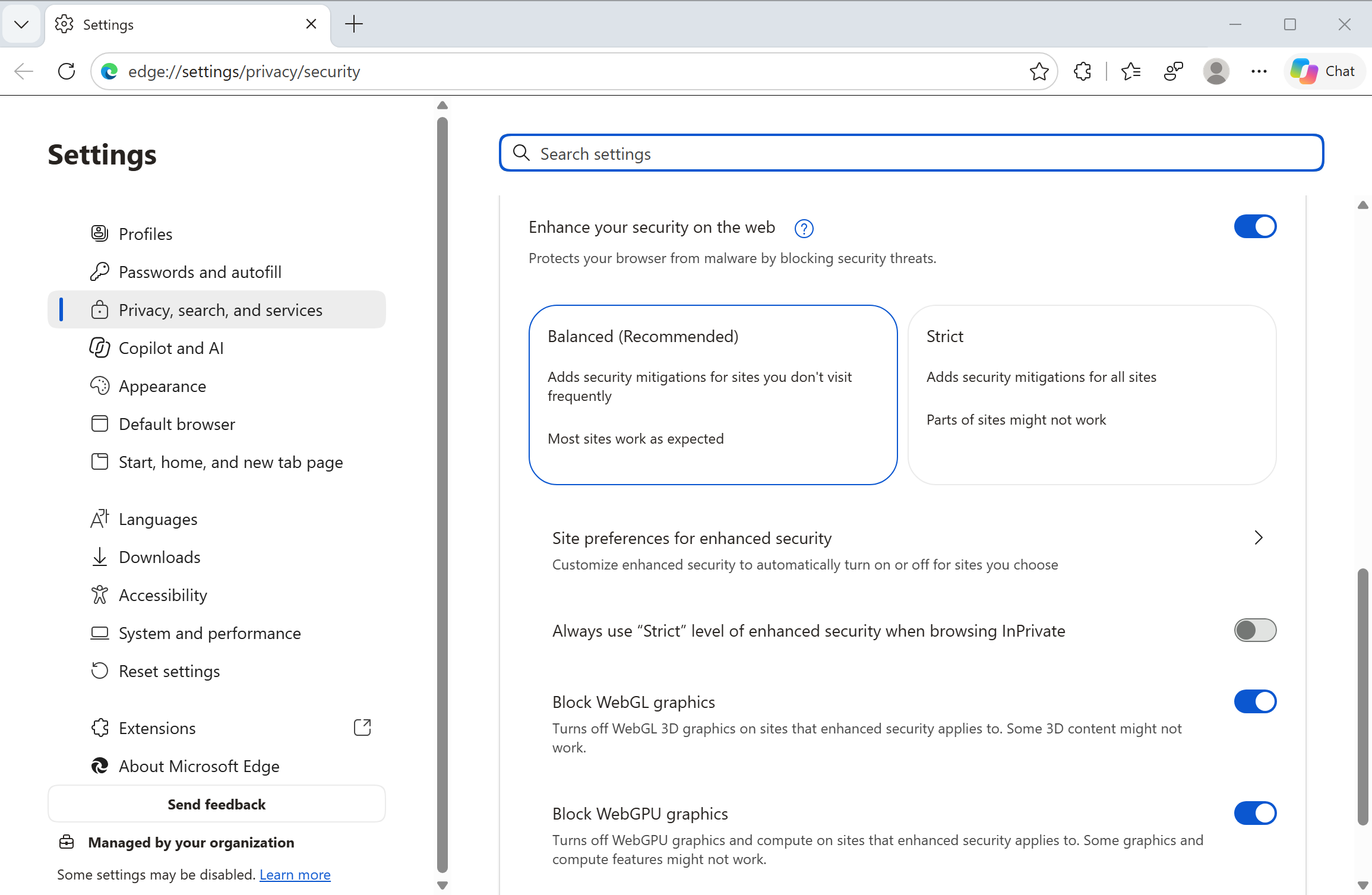
- Turn it on: edge://settings/privacy/security → turn on Enhance your security on the web → choose Strict. Block WebGL graphics and Block WebGPU graphics appear below it. They are enabled by default on profiles that had not previously used enhanced security before. Existing ESM users currently have to opt-into this change by enabling these two setting.
- Reload any existing test pages. A “Lockdown Enabled” indicator appears in the address bar when WebGL or WebGPU is blocked for that page.

- Open the DevTools Console while testing the page. Warnings identify WebGL or WebGPU requests blocked by Lockdown Mode.
- Check blocking settings and past block decisions in edge://security-diagnostics → Enhanced Security Mode.
What’s next
The first version of Edge Lockdown Mode is now available in Canary behind the #edge-sdsm-plus flag. It currently lets you block WebGL and WebGPU, and we plan to extend it to more capabilities over the coming releases. In the meantime, please try it using the steps above and send us feedback through Settings, Help and Support.
Reducing attack surface complements faster updates and safer code. For users and organisations who may be targeted with new exploits, these trade-offs can be worthwhile. Thank you for testing Lockdown Mode and helping us refine the balance between stronger protection and everyday usability.