MSEdgeExplainers
Web Install API (current document)
Authors:
Participate
Table of contents
- Introduction
- User facing problem
- Use Case
- Proposed Approach
- Alternatives considered
- Accessibility, Privacy and Security Considerations
- Future work
- Stakeholder feedback
Status of this Document
This document is a starting point for engaging the community and standards bodies in developing collaborative solutions fit for standardization. As the solutions to problems described in this document progress along the standards-track, we will retain this document as an archive and use this section to keep the community up-to-date with the most current standards venue and content location of future work and discussions.
- This document status: Active
- Expected venue: W3C Web Applications Working Group
- Current version: this document
Introduction
The Web Install API provides a way to democratise and decentralise web application acquisition, by enabling "do-it-yourself" end users and developers to have control over the application discovery and distribution process. It provides the tools needed to allow a web site to install a web app.
Note: The Web Install API can be used to install the current loaded web app, as explained in this document. It can also be used to install other web apps. Refer to this document for the background document functionality.
User-facing problem
End users don't have a standard, cross-platform way to acquire applications. Users are usually faced with inconsistent, hidden and proprietary mechanisms (custom protocols, stores) to acquire applications.
The Web Install API aims to fix this issue by creating an open, ergonomic, standardized, and cross-platform supported way of acquiring applications.
The feature aims to benefit users that:
- might not know that a web app exists for the current origin.
- don't understand what the icon/prompt in the browser's address bar does.
- don't know how to deep search several layers of browser UX to add the app to their devices.
- don't use app stores to discover new app experiences.
Goals
- Enable installation of the current loaded web app.
- Complement
beforeinstallpromptfor platforms that do not prompt for installation of web content. - Enable UAs to suppress potential installation-prompt spam.
Non-goals
- Install arbitrary web content that is not an app (target must have a manifest file or processed manifest
id). Reasons expanded here. - Change the way the UA currently allows installation of a web app.
- Define what "installation" means. This is up to each platform and overall we refer to the acquisition of an app onto a device.
Use cases
Installation of a current document is when the install API is invoked to install the web application located at the web page in the UA's current navigation context. This enables the following use case (among others):
Websites installing their web apps
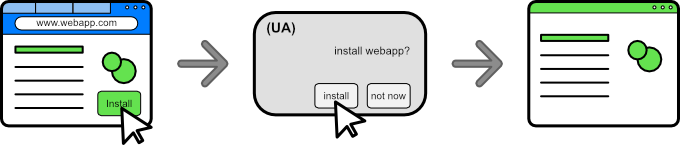
Picture a user browsing on their favorite video streaming web app. The user might browse to this web app daily, yet not be aware that there is a way that they can install the app directly from the app's UI (or that that specific web site has an app altogether). This could be through a button that the webapp would be able to implement, that would trigger the installation.
Proposed approach
As exemplified in the use case, an end user can be browsing the web, and a web application can present UX to acquire "itself". We propose an open, ergonomic and standard way of acquiring web applications that enables end users to easily and safely install content on their devices. The proposed approach is a new API in the shape of promise-based method navigator.install();. This promise will:
- Resolve when an installation was completed.
- The success value will be an object that contains:
id: string with the processedmanifest_idof the installed app.
- The success value will be an object that contains:
- Be rejected if the app installation did not complete. It'll reject with a
DOMExceptionvalue of:AbortError: The installation/UX/permission (prompt) was closed/cancelled.DataError: There is no manifest file present, there is noidfield defined in the manifest.
The proposal extends the navigator interface with the install method. To install the current document/loaded web app, it must have a link to a manifest file and an id value defined in said manifest file. Having an id in the installed app allows to avoid certain pitfalls when updating the app.
Steps to install the app
- User gesture activates code that calls the
install()method. - If current document has a manifest file, continue. Else reject with
DataError. - If manifest file has an
idfield defined, continue. Else reject withDataError. - UA shows the acquisition/installation confirmation UX (prompt/dialog). If the user accepts, continue. Else reject with
AbortError. - Promise resolves with processed
idof installed app and application follows the platform's post-install UX (adds to Dock/opens app/adds to mobile app drawer).
Note: if an application is installed, the UA can choose to display UX to launch this application. The behaviour for this case is the same as if the app is not installed: The promise would resolve if the application opens, and rejects otherwise, with an
AbortError.
There is an open PR to add this to the Manifest spec.
Web application acquisition
As defined in the non-goals section, the concept of what "installation" means can vary per browser and platform. These are the current behaviours on some browsers that can represent acquiring an app or "installing" it:
- Apple's Safari allows a user to add (web content) to dock.
- Chromium browsers can prompt a user to "install" a web app to the system.
- Mozilla Firefox on mobile allows to add web content to the home screen.
The main benefit of "installation" for the end user is that they can experience their web applications with better UX, including easier access through icons/app drawer/dock integrations and better/advanced platform integrations like sharing, notifications and others.
Sample code
/* tries to install the current document */
const installApp = async () => {
    if (!navigator.install) return; // api not supported
    try {
        await navigator.install();
    } catch(err) {
        switch(err.name){
            case 'AbortError':
                /* Operation was aborted*/
                break;
        }
    }
};
Alternatives considered
Declarative install
An alternate solution is to have a declarative way to install web apps. This can be achieved by allowing a new target type of _install to the HTML anchor tag. It can also use the rel attribute to hint to the UA that the url in the link should be installed.
<a href="https://airhorner.com" target="_install">honk</a>
<a href="https://airhorner.com" rel="install">honk</a>
Pros:
- Platform fallback to navigate to the content automatically.
- Does not need JavaScript.
Cons:
-
Takes the user out of the current context, providing no alternative if the use case benefits from them staying in context.
-
Limits the amount of information a developer can act upon that the promise provides, such as if the installation was successful.
-
Developers can't easily detect UA declarative support in order to be able to tailor their UX to different situations.
-
More complex combinations for the UA to take into account: additional attributes that act on a link HTML tag (
a) like the target mean there is an increased set of scenarios that might have unintended consequences for end users. For example, how does a target of_ topdiffer from_blank? While we could look at ignoring thetargetattribute if arelattribute is present, the idea is to use acquisition mechanisms that are already present in UAs.
We believe that a declarative implementation is a simple and effective solution, and a future entry point for the API. It should be considered for a v2 of the capability. For the current solution, we've decided to go with an imperative implementation since it allows more control over the overall installation UX:
-
Allows the source to detect if an installation occurred with ease. (resolves/rejects a promise).
-
Supports
install_url. This url can be an optimized url or the normal homepage that an application already has. The advantage is that unlike a declarative version, there is no scenario where an end user can be left stranded accidentally in a blank page that is meant to be a lightweight entry point to the app. -
The developer ergonomics of handling a promise are better than responding to an
atag navigation. -
Keeps the user in the context, which can be beneficial in certain scenarios (importantly, if the developer wants to take the user out of the current context, they can do so by navigating).
PEPC version of the API
A version of Web Install that switches the permission prompt for a PEPC element is considered. While we remain enthusiastic about PEPC, we prefer to be cautious in its adoption and support until the feature ships and there is commitment to ship from more browser engines.
The main benefit from this alternative would be a clearer user intent on a UX surface controlled by the UA. This can mitigate spoofing and spamming with a dedicated DOM element to install web apps, and we are observing its development and considering it for future work.
Accessibility, Privacy, and Security Considerations
Same-origin policy
- The installed content is the same origin therefore shares the same permissions already granted to that origin. Installation does not alter or grant any permissions.
Preventing installation prompt spamming from third parties
-
This API can only be invoked in a top-level navigable and be invoked from a secure context.
-
The biggest risk for the API is installation spamming. To minimize this behaviour, installing a PWA using the Web Install API requires transient activation.
Feature does not work on Incognito or private mode
The install capability should not work on off-the-record profiles, including incognito and guest modes, and the promise should always reject if called in a private browsing context.
Rejecting promise with limited existing DOMException names
To protect the user's privacy, the API does not create any new error names for the DOMException, instead it uses common existing names: AbortError, DataError, NotAllowError and InvalidStateError. This makes it harder for the developer to know if an installation failed because of a mismatch in id values, a wrong manifest file URL or if there is no id defined in the manifest.
- The promise will reject with an
AbortErrorif:- The install permission is required but hasn't been granted.
- Installation was closed/cancelled.
- The promise will reject with a
DataErrorif:- No manifest file present or invalid install URL.
- No
idfield defined in the manifest file.
- The promise will reject with an
NotAllowedErrorif:- Invocation happens without a user activation.
- The promise will reject with an
InvalidStateErrorif:- User is outside of the main frame.
Future Work
- A declarative version of the Install API is also possible to be part of a future version of the API. This provides another entry point to the install capability.
- A version of Web Install that uses PEPC instead of the current permission model is an interesting idea as future work, pending the evolution and shipment of the PEPC proposal.
Stakeholder Feedback / Opposition / FAQs
Refer to this document for stakeholder feedback for the Web Install API.
References & acknowledgements
This explainer takes on a reimagination of a capability previously published by PEConn.
Throughout the development of this capability we've revceived a lot of feedback and support from lots of people. We've like to give a special thanks to Daniel Appelquist, Amanda Baker, Marcos Cáceres, Lu Huang, Kristin Lee, Daniel Murphy, Alex Russell and Howard Wolosky for their input.
Feedback
For suggestions and comments, please file an issue.