MSEdgeExplainers
Web Install API (background document)
Authors: Diego Gonzalez
Participate
Table of contents
- Introduction
- User facing problem
- Use Case
- Proposed Approach
- Alternatives considered
- Accessibility, Privacy and Security Considerations
- Future work
- Stakeholder feedback
Status of this Document
This document is a starting point for engaging the community and standards bodies in developing collaborative solutions fit for standardization. As the solutions to problems described in this document progress along the standards-track, we will retain this document as an archive and use this section to keep the community up-to-date with the most current standards venue and content location of future work and discussions.
- This document status: Active
- Expected venue: W3C Web Incubator Community Group
- Current version: this document
Introduction
The Web Install API provides a way to democratise and decentralise web application acquisition, by enabling "do-it-yourself" end users and developers to have control over the application discovery and distribution process. It provides the tools needed to allow a web site to install a web app.
Note: The Web Install API can be used to install a background web app, as explained in this document. It can also be used to install the current web app the user has open. Refer to this document for the current document functionality.
User-facing problem
End users don't have a standard, cross-platform way to acquire applications. Users are usually faced with inconsistent, hidden and proprietary mechanisms (custom protocols, stores) to acquire applications.
The Web Install API aims to fix this issue by creating an open, ergonomic, standardized, and cross-platform supported way of acquiring applications.
The feature aims to benefit users that:
- might not know that a web app exists for the current origin.
- don't understand what the icon/prompt in the browser's address bar does.
- don't know how to deep search several layers of browser UX to add the app to their devices.
- don't use app stores to discover new app experiences.
Goals
- Enable installation of background document web apps.
- Extend the functionality of
beforeinstallpromptthat cannot install content other than the current loaded web application. - Enable UAs to suppress potential installation-prompt spam.
Non-goals
- Install arbitrary web content that is not an app (target must have a manifest file or processed manifest
id). Reasons expanded here. - Change the way the UA currently allows installation of a web app.
- Define what "installation" means. This is up to each platform and overall we refer to the acquisition of an app onto a device.
Use cases
Installation of a background document is when the install API is invoked to install a web application that is different from the one currenlty loaded in UA's navigation context. This can be another web app in the same origin, or it can be in a different origin. This enables the following use case (among others):
Suite of Web Apps
An example would be a family of software applications, like a productivity or photography suite, where each application is accessed from a different web page. The developer is in control and can effectively advertise and control their applications, without having to redirect users to platform-specific proprietary repositories, which is what happens now.
SERP app install
Developers of Search Engines could use the API to include a way to directly install an origin that is an application. A new feature could be offered by search engines that could see them facilitating a frictionless way to acquire an app that a user is searching for. This could also aid discovery as a user might not be aware that a specific origin has an associated web application they could acquire.
Creation of online catalogs
Another potential use case for the API is related to the creation of online catalogs. A web site/app can list and install web apps. A unique aspect of this approach is that since the applications that are installed are web apps, this could enable a new set of true cross-device, cross-platform app repositories.
Proposed approach
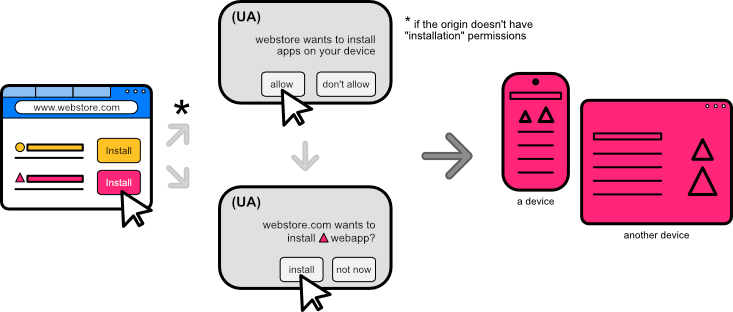
As exemplified in the use case, an end user would be able to acquire an app from a suite or family of apps directly from one single page. We propose an open, ergonomic and standard way of acquiring web applications that enables end users to easily and safely install content on their devices. The proposed approach is a new API in the shape of promise-based method navigator.install([<install_url>[, <manifest_id>[, <params>]]]);. This promise will:
- Resolve when an installation was completed.
- The success value will be an object that contains:
id: string with the processedmanifest_idof the installed app.
- The success value will be an object that contains:
- Be rejected if the app installation did not complete. It'll reject with a
DOMExceptionvalue of:AbortError: The installation/UX/permission (prompt) was closed/cancelled.DataError: There is no manifest file present, there is noidfield defined in the manifest.
Signatures of the install method
The Web Install API consists of the extension to the navigator interface with an install method. This method has 2 different signatures that can be used to install background documents. The possible parameters it may receive are:
install_url: a url meant for installing an app. This url can be any url in scope of the manifest file that links to it. For an optimal user experience, it is recommended that developers use aninstall_urlthat does not redirect and only contains content that is relevant for installation purposes (essentially just a reference to the web manifest).manifest_id: declares the specific application to be installed. This is the unique id of the application that will be installed. As a parameter, this value must match theidvalue specified in the manifest file or the processedidstring once an application is installed.
The manifest_id is the what to install, the install_url is the where to find it.
Unless the UA decides to gate this functionality behind installation, the behaviour between calling the install method on a tab or on an installed application should not differ.
One parameter navigator.install(<install_url>)
This signature can be used to install the current or a background document.
Note: If installing the current document the
install_urlpoints to itself.
Requirements:
<install_url>must be a valid URL.- The document present at
<install_url>must link to a manifest file. - The manifest file linked in the document present at
<install_url>must have anidvalue defined.
Two parameters navigator.install(<install_url>, <manifest_id>)
This signature is intended to install background documents that don't necessarily have an explicit id value defined in the manifest file.
Requirements:
<install_url>must be a valid URL.- The document present at
<install_url>must link to a manifest file. - The
<manifest_id>parameter must match the processed string after processing theidmember.
Note: according to the manifest spec, if there is no
idmember present, the processed string resolves to that of thestart_url.
Note: We acknowledge that only around 4% (as of 2024) of web apps have defined
ids in their manifest. We also know thatids are a crucial part to support to avoid situations of multiple same applications with no path to being updated. For apps that have aniddefined in their manifest, the 1 param signature is useful. For apps that do not define theidfield, they can be installed with the 2 parameter signature.
Steps to install the app
To install an application with the Web Install API, the process is as follows:
Background Document (1 param)
- User gesture activates code that calls the
install(<install_url>)method. - If the
<install_url>is not the current document, the UA asks for permission to perform installations (it not previously granted). Else reject withAbortError. - UA tries to fetch the background document present at the
<install_url>and its manifest file. - If fetched document has a manifest file, continue. Else reject with
DataError. - If manifest file linked to the fetched document has an
idfield defined, continue. Else reject withDataError. - UA shows the acquisition/installation confirmation UX (prompt/dialog). If the user accepts, continue. Else reject with
AbortError. - Promise resolves with processed
idof installed app and application follows the platform's post-install UX (adds to Dock/opens app/adds to mobile app drawer).
Background Document (2 param)
- User gesture activates code that calls the
install(<install_url>, <manifest_id>)method. - If the
<install_url>is not the current document, the UA asks for permission to perform installations (if not previously granted). Else reject withAbortError. - UA tries to fetch the background document present at the
<install_url>and its manifest file. - If fetched document has a manifest file, continue. Else reject with
DataError. - If
<manifest_id>matches the processedidfrom the manifest of the fetched document, continue. Else reject withDataError. - UA shows the acquisition confirmation UX (prompt/dialog). If the user accepts, continue. Else reject with
AbortError. - Promise resolves with processed
idof installed app and application follows the platform's post-install UX (adds to Dock/opens app/adds to mobile app drawer).
Note: if an application is installed, the UA can choose to display UX to launch this application. The behaviour for this case is the same as if the app is not installed: The promise would resolve if the application opens, and rejects otherwise, with an
AbortError.
There is an open PR to add this to the Manifest spec.
Sample code
/* tries to install a background document (app) */

const installApp = async (install_url, manifest_id) => {
    if (!navigator.install) return; // api not supported
    try {
        await navigator.install(install_url, manifest_id);
    } catch(err) {
        switch(err.name){
            case 'AbortError':
                /* Operation was aborted*/
                break;
            case 'DataError':
                /*issue with manifest file or id*/
                break;
        }
    }
};
Web application acquisition
As defined in the non-goals section, the concept of what "installation" mean can vary per browser and platform. These are the current behaviours on some browsers that can represent acquiring an app or "installing" it:
- Apple's Safari allows a user to add (web content) to dock.
- Chromium browsers can prompt a user to "install" a web app to the system.
- Mozilla Firefox on mobile allows to add web content to the home screen.
The main benefit of "installation" for the end user is that they can experience their web applications with better UX, including easier access through icons/app drawer/dock integrations and better/advanced platform integrations like sharing, notifications and others.
Alternatives considered
Declarative install
An alternate solution is to have a declarative way to install web apps. This can be achieved by allowing a new target type of _install to the HTML anchor tag. It can also use the rel attribute to hint to the UA that the url in the link should be installed.
<a href="https://airhorner.com" target="_install">honk</a>
<a href="https://airhorner.com" rel="install">honk</a>
Pros:
- Platform fallback to navigate to the content automatically.
- Does not need JavaScript.
Cons:
-
Takes the user out of the current context, providing no alternative if the use case benefits from them staying in context.
-
Limits the amount of information a developer can act upon that the promise provides, such as if the installation was successful.
-
Developers can't easily detect UA declarative support in order to be able to tailor their UX to different situations.
-
More complex combinations for the UA to take into account: additional attributes that act on a link HTML tag (
a) like the target mean there is an increased set of scenarios that might have unintended consequences for end users. For example, how does a target of_ topdiffer from_blank? While we could look at ignoring thetargetattribute if arelattribute is present, the idea is to use acquisition mechanisms that are already present in UAs.
We believe that a declarative implementation is a simple and effective solution, and a future entry point for the API. It should be considered for a v2 of the capability. For the current solution, we've decided to go with an imperative implementation since it allows more control over the overall installation UX:
-
Allows the source to detect if an installation occurred with ease. (resolves/rejects a promise).
-
Supports
install_url. This url can be an optimized url or the normal homepage that an application already has. The advantage is that unlike a declarative version, there is no scenario where an end user can be left stranded accidentally in a blank page that is meant to be a lightweight entry point to the app. -
The developer ergonomics of handling a promise are better than responding to an
atag navigation. -
Keeps the user in the context, which can be beneficial in certain scenarios (importantly, if the developer wants to take the user out of the current context, they can do so by navigating).
PEPC version of the API
A version of Web Install that switches the permission prompt for a PEPC element is considered. While we remain enthusiastic about PEPC, we prefer to be cautious in its adoption and support until the feature ships and there is commitment to ship from more browser engines.
The main benefit from this alternative would be a clearer user intent on a UX surface controlled by the UA. This can mitigate spoofing and spamming with a dedicated DOM element to install web apps, and we are observing its development and considering it for future work.
Accessibility, Privacy, and Security Considerations
Same-origin policy
- The content installed using the
navigator.installdoes not inherit or auto-grant permissions from the installation origin. This API does not break the same-origin security model of the web. Every different domain has its own set of independent permissions bound to their specific origin.
Note: any application installed with the
installmethod will have to ask for permissions (if any) when the user opens and interacts with the application.
Preventing installation prompt spamming from third parties
-
This API can only be invoked in a top-level navigable and be invoked from a secure context.
-
The biggest risk for the API is installation spamming. To minimize this behaviour, installing a PWA using the Web Install API requires a user activation.
-
A new permission type will be introduced for an origin, that would allow it to install web apps. The first time a website requests to install (use the API) any document other than itself, the UA will prompt the user to confirm that the website can install apps into the device. This prompt is similar to that of other permissions like geolocation or camera/microphone. The UA can decide how to implement this prompt.
A website that wants to install apps will require this new permission and will only be able to prompt the user for this in a period of time defined by the implementer. This will avoid spam from websites constantly asking for a permission to install apps, and will force websites to only prompt when there is a meaningful user intent to install apps.
The installation permission for an origin should be time-limited and expire after a period of time defined by the UA. After the permission expires the UA will prompt again for permission from the user.
New "installation" Permission for origin
A new "installation" permission is required if the content that is installing is not the current document. This permission is associated to the origin.
This results in a new integration with the Permissions API. The install API will make available the "installation" PermissionDescriptor as a new powerful feature. This would make it possible to know programmatically if install would be blocked.
/* example of querying for the state of an installation permission using the Permission API  */

const { state } = await navigator.permissions.query({
  name: "installation"
});
switch (state) {
  case "granted":
    navigator.install('https://productivitysuite.com');
    break;
  case "prompt":
    //shows the install button in the web UI
    showInstallButton();
    break;
  case "denied":
    redirectToApp();
    break;
}
Note: For background documents, a permission prompt will appear for origins that do not have the capability to install apps. Even if the installation is of a "background document" in the same origin, for consistency the origin must have the permission to install apps. The only cases that will not prompt for the permission are the installation of the "current document" or a "background document" in an origin that already has installation permissions.
Example:
The app located in https://productivitysuite.com displays in its homepage 3 buttons that aim to install 3 different apps (notice all apps are in the same origin):
- the text processor located at
https://productivitysuite.com/text - the presentation app located at
https://productivitysuite.com/slides - the spreadsheet located at
https://productivitysuite.com/spreadsheet
The end user goes to the homepage in the https://productivitysuite.com's origin and clicks on the button to install the presentation application. As this is a background document (not the current document the user is interacting with) and the origin does not have permission to install apps, a permission prompt will appear. If this permission is granted for the origin, it can now install apps. After this permission prompt, the second prompt where the user confirms the installation appears.
The end user then tries to install the text processor, and since the origin has been granted the permission, then the UA will skip the permission prompt and skip directly to confirm installation with a prompt indicating that "productivity suite wants to install text processor". The installation permission is bound to an origin.
If the user were to deny the permission to install for the origin, they could browse to the app itself and once there, they could install the application. In this case, there wouldn't be any permission prompt required as this would now be a current document installation.
Rejecting promise with limited existing DOMException names
To protect the user's privacy, the API does not create any new error names for the DOMException, instead it uses common existing names: AbortError, DataError, NotAllowError and InvalidStateError. This makes it harder for the developer to know if an installation failed because of a mismatch in id values, a wrong manifest file URL or if there is no id defined in the manifest.
The promise will reject with an AbortError if:
- Installation was closed/cancelled.
- The install permission is required but hasn't been granted.
The promise will reject with a DataError if:
- No manifest file present or invalid install URL.
- No
idfield defined in the manifest file. - There is a mismatch between the
idpassed as parameter and the processedidfrom the manifest.
The promise will reject with an NotAllowedError if:
- Invocation happens without a user activation.
The promise will reject with an InvalidStateError if:
- User is outside of the main frame.
Example: combining errors to mitigate private data leaking
A bad actor could try to determine if a user is logged into a dating website. This dating web site could provide install UX after a user is logged in (the dating website will likely have a page that serves a manifest, but it requires authentication). The bad actor could deceive the user to provide a user gesture allowing them to silently call navigator.install _intentionally+ with the wrong manifest id. Their hope would be to get an error indicating a manifest id mismatch, meaning that the user had access to retrieve the manifest (and was thus logged-in), or an error indicating that the manifest could not be retrieved (meaning that they weren't logged-in).
The benefit of the defined error handling for this feature is that the invoking call doesn't know if the DataError is because:
i. manifest file was not accessible (user not logged-in) or
ii. there was a mismatch between the id field and the provided 'wrong' parameter (user is logged-in).
Note: Using less verbose errors by grouping them into existing ones reduces leakage of information. This is the reason why we avoid using multiple errors or creating new ones, like a previously proposed
ManifestIdMismatchandNoIdInManifest.
Gating capability behind installation
A UA may choose to gate the navigator.install capability behind a requirement that the installation origin itself is installed. This would serve as an additional trust signal from the user towards enabling the functionality.
Showing try-before-you-buy UX
The install UX can show a try-before-you-buy prompt. The UA may decide to show a prompt, some sort of rich-install dialog with additional information found in the manifest file, or load a preview of the app with the install confirmation. This is an implementation detail completely up to the UA.
Feature does not work on Incognito or private mode
The install capability should not work on incognito, and the promise should always reject if called in a private browsing context.
The user gesture, the new origin permission, the final installation confirmation (current default behaviour in the browser before installing an app) and the optional gated capability work together to minimize the risk of origins spamming the user for unrequested installations, give developers flexibility to control the distribution of their apps and end users the facility to discover and acquire content in a frictionless way.
Future Work
- A declarative version of the Install API is also possible to be part of a future version of the API. This provides another entry point to the install capability.
- A version of Web Install that uses PEPC instead of the current permission model is an interesting idea as future work, pending the evolution and shipment of the PEPC proposal.
Stakeholder Feedback / Opposition / FAQs
Refer to this document for stakeholder feedback for the Web Install API.
References & acknowledgements
This explainer takes on a reimagination of a capability previously published by PEConn.
Throughout the development of this capability we've revceived a lot of feedback and support from lots of people. We've like to give a special thanks to Daniel Appelquist, Amanda Baker, Marcos Cáceres, Lu Huang, Kristin Lee, Daniel Murphy, Alex Russell and Howard Wolosky for their input.
Feedback
For suggestions and comments, please file an issue.