MSEdgeExplainers
HTML Attribute to Allow/Disallow Handwriting Input (i.e., "ink to text")
Outdated
As of November 14th 2024, this explainer has been replaced with HandwritingIntentCSSValue which proposes a new keyword for the touch-action CSS attribute.
Consider all sections required unless otherwise noted.
Authors: Rahul Arakeri, Adam Ettenberger, Ben Mathwig, Jenny Ma
Status of this Document
This document is a starting point for engaging the community and standards bodies in developing collaborative solutions fit for standardization. As the solutions to problems described in this document progress along the standards-track, we will retain this document as an archive and use this section to keep the community up-to-date with the most current standards venue and content location of future work and discussions.
- This document status: Active
- Expected venue: W3C Web Incubator Community Group, WHATWG HTML
- Current version: this document
Introduction
A new web standard mechanism is needed to indicate whether an element or its subtree should allow user agent handwriting input.
Authors may need to exclude an editable text element from handwriting input for UX or app behavioral reasons.
This will be useful for developers of text-editing apps, drawing apps, or apps with their own stylus-optimized input handling.
Goals
Give authors granular per-document and per-element control over which content should (dis)allow handwriting input.
Non-Goals
- Allowing websites to determine whether the user agent supports handwriting as an input method, or whether the user has handwriting input enabled.
- Allowing websites to enable handwriting when it would not otherwise be enabled.
Use Cases
Some scenarios where a website or application may want to disable handwriting input:
- Document editor that wants to temporarily disable handwriting input while certain tools are selected, to support using a stylus to seamlessly draw, place, or size non-text content overtop an editable text region.
- Outlook drawing tools with "text pen"
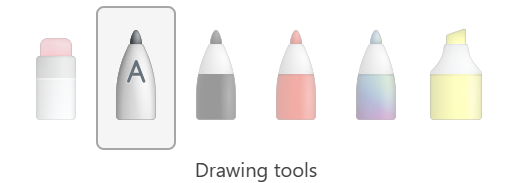
- Outlook drawing tools with "text pen"
- Application with custom form controls that accept sensitive input, have a strict format, or include special characters.
- Application with custom text inputs or editing experiences that override default browser behaviors by observing and handling input events and editing experiences, doesn't support input method editor (IME) or
composition{start|end|update}events, or if for any reason the experience designed by website authors doesn't behave as they intend when handwriting input is available.

Proposed Solution
Introduce a new HTMLElement HTML+IDL attribute which allows authors to specify whether an element should (dis)allow handwriting input.
Keywords and States
The handwriting attribute is an enumerated attribute with the following keywords and states:
| Keyword | State | Brief Description |
|---|---|---|
| false | false |
The element will not allow handwriting input even when supported by the user agent. |
| true | true |
The element will allow handwriting input if supported by the user agent. |
| (the empty string) | true |
The element will allow handwriting input if supported by the user agent. |
The attribute's missing value default is the default state and the attribute's invalid value default is the true state.
Computed Value
The computed handwriting value of a given element can be determined by running the following steps:
- If
element'shandwritingcontent attribute is in thefalsestate, return "false". - If
element'shandwritingcontent attribute is in thedefaultstate, element has a parent element, and thecomputed handwriting valueof element's parent element is "false", then return "false". - Return "true".
HTML Attribute
All HTML elements may have the handwriting attribute set. See "Keywords and States" for accepted values.
Syntax
<textarea></textarea>                       <!-- the computed handwriting value is true -->
<textarea handwriting></textarea>           <!-- the computed handwriting value is true -->
<textarea handwriting=""></textarea>        <!-- the computed handwriting value is true -->
<textarea handwriting="true"></textarea>    <!-- the computed handwriting value is true -->
<textarea handwriting="false"></textarea>   <!-- the computed handwriting value is false -->

<div handwriting="false">
  <textarea></textarea>                     <!-- the computed handwriting value is false -->
  <textarea handwriting></textarea>         <!-- the computed handwriting value is true -->
  <textarea handwriting=""></textarea>      <!-- the computed handwriting value is true -->
  <textarea handwriting="true"></textarea>  <!-- the computed handwriting value is true -->
  <textarea handwriting="false"></textarea> <!-- the computed handwriting value is false -->
</div>
IDL Attribute
The HTMLElement handwriting attribute will be exposed as an IDL attribute to JavaScript with the type DOMString, similar to the writingsuggestions or contenteditable attributes.
When getting the IDL attribute, the computed handwriting value will be returned, see the "Computed Value" section for details.
When setting the IDL attribute, the HTML attribute is updated to the assigned string value.
Syntax
var element = document.createElement("div");
console.assert(typeof(element.handwriting) == "string");
console.assert(!element.hasAttribute("handwriting"));
console.assert(element.handwriting == "true");

element.handwriting = "true";
console.assert(element.getAttribute("handwriting") == "true");
console.assert(element.handwriting == "true");

element.handwriting = false;
console.assert(element.getAttribute("handwriting") == "false");
console.assert(element.handwriting == "false");

element.handwriting = "unexpected";
console.assert(element.getAttribute("handwriting") == "unexpected");
console.assert(element.handwriting == "true");
Privacy and Security Considerations
Privacy
Since the proposed HTML+IDL attribute should not interact with other HTML or IDL attributes, DOM properties, CSS properties, or JavaScript APIs in an interesting way, and the attribute doesn't reflect whether a user agent supports or has enabled handwriting input, it shouldn't be possible to use this for fingerprinting. As of writing this, I'm not aware of any way the proposed attribute could be used towards nefarious means since it's merely a hint for the browser to (dis)allow handwriting input and the handwriting state doesn't expose anything about the user nor their device.
Security
There are no known security impacts of the features in this specification.
Alternative Solutions
The proposal is for this to be an HTML+IDL attribute.
-
Why not a JavaScript API? (e.g.,
e.enableHandwriting()ore.setHandwritingState(...),e.getHandwritingState()ande.getComputedHandwritingValue())- [Pro] Granular control over which elements should allow handwriting input.
- [Con] Introduces more complexity and is not as simple as an HTML attribute or CSS property.
- [Con] An HTML attribute can be exposed to JavaScript as a IDL attribute which may be more ergonomic.
- [Con] If users or organizations disable JavaScript for their browsers there would need to be another mechanism to disable handwriting input.
-
Why not a CSS property?
- [Pro] Granular control over which elements should allow handwriting input.
- [Pro] CSS pattern matching is a powerful tool and may be more ergonomic for some use cases.
- [Con] An HTML attribute may be more ergonomic than a stylesheet or inline styles for some use cases.
- [Con] If users or organizations disable CSS for their browsers there would need to be another mechanism to disable handwriting input.
-
Why not some combination of all the above?
- [Pro] Allows for the greatest flexibility with multiple paths to achieve the same goal, so authors can choose the approach that best fits their use case or preference.
- [Con] More complex backend implementation and less obvious frontend implementation due to the combination available to specify per-document or per-element
handwritingstate.
-
Why not extend an existing attribute or property?
- [HTML]
inputmode- Related to but distinct from <input>
type. Is only concerned with virtual keyboard inputs.
- Related to but distinct from <input>
- [CSS]
pointer-events:- Is concerned with whether an element or visual components of an element can be the target of a pointer event, not what kinds of pointer devices can be used.
- [CSS]
touch-action:- Related to what touch gestures will be handled by the application rather than the user agent. It could be argued that handwriting input is like a gesture. Similar to this proposal,
touch-actionacts like an inherited attribute. - The main drawback of
touch-actionproperty is it's defined with conflicting "opt-in" and "opt-out" behaviors.- The property default (
auto) is "out-out", meaning the user agent will perform all touch gestures on behalf of the application. - Specifying a value makes the property "opt-in", meaning the user agent will perform touch gestures on behalf of the application only for the behaviors specified.
- e.g., An application that wants to disable
pinch-zoommay specifytouch-action: pan-x pan-y;, adding support for any new keywords such ashandwritingwould cause such applications to disable their user agent behaviors without additional consideration. - If
touch-actionwere defined such that specifying a value disabled user agent handling of specified gestures, it would consistently behave as "opt-out" and would be a great candidate for disabling handwriting input without affecting existing applications.
- The property default (
- Samsung disables handwriting input when
touch-actiondoesn't have thepangesture enabled, which behaves very similar to this proposal.
- Related to what touch gestures will be handled by the application rather than the user agent. It could be argued that handwriting input is like a gesture. Similar to this proposal,
- [HTML]