MSEdgeExplainers
CSS Property to Allow/Disallow Handwriting Input (i.e., "ink to text")
Authors: Rahul Arakeri, Adam Ettenberger, Ben Mathwig, Jenny Ma, Gastón Rodríguez
Status of this Document
This document is a starting point for engaging the community and standards bodies in developing collaborative solutions fit for standardization. As the solutions to problems described in this document progress along the standards-track, we will retain this document as an archive and use this section to keep the community up-to-date with the most current standards venue and content location of future work and discussions.
- This document status: Active
- Expected venue: W3C Web Incubator Community Group, Pointer Events Working Group
- Current version: this document
Introduction
Multiple platforms have implemented an API to support handwriting gestures on touch devices. In these platforms, the O.S. takes the gestures a user performed (via touch or stylus) and after applying some character recognition technology to the user's handwriting introduces text to the corresponding text editable input.
Web browsers that integrate this capability have to contend with other user agent defined touch behavior, for example, to determine if the gesture is intended to be a scroll or if it should be interpreted as handwriting. Whenever a user starts handwriting near a text editable input field the browser must first discern the user's intention, then change focus to the most appropriate editable input and then emit pointer events.
However, browsers that recognize handwriting behave differently from those that don’t, and handwriting input isn’t always desirable for every application.
Developers may need to disable handwriting input for a better user experience or specific app behaviors. Current methods to disable handwriting input cause friction for developers and are not standardized.
This feature introduces a new web standard that simplifies enabling or disabling handwriting input across multiple platforms. By specifying a new keyword in the touch-action CSS property, developers can now easily indicate whether an element or its subtree should allow handwriting input.
Goals
Give authors granular per-document and per-element control over which content should (dis)allow handwriting input.
Non-Goals
- Allowing websites to determine whether the user agent supports handwriting as an input method, or whether the user has handwriting input enabled.
- Allowing websites to enable handwriting when it would not otherwise be enabled.
- Describe how handwriting capabilities should be implemented by browsers or platforms.
Use Cases
Some scenarios where a website or application may want to disable handwriting input:
- Document editor that wants to temporarily disable handwriting input while certain tools are selected, to support using a stylus to seamlessly draw, place, or size non-text content overtop an editable text region.
- Outlook drawing tools with "text pen"
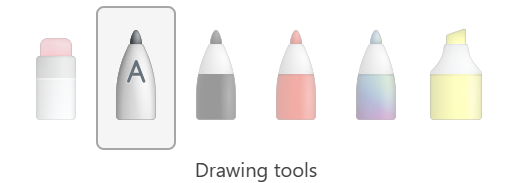
- Outlook drawing tools with "text pen"
- Application with custom form controls that accept sensitive input, have a strict format, or include special characters.
- Application with custom text inputs or editing experiences that override default browser behaviors by observing and handling input events and editing experiences, doesn't support input method editor (IME) or
composition{start|end|update}events, or if for any reason the experience designed by website authors doesn't behave as they intend when handwriting input is available.

Proposed Solution
Introduce a new value, handwriting, to the CSS property touch-action which allows authors to specify whether an element should allow handwriting input.
The touch-action CSS property is used by authors to define for whether user agents should execute their direct manipulation behavior for touch and pen gestures. When the spec was written this only included panning and zooming, which were addressed jointly via the manipulation keyword. This change would modify the meaning of the manipulation value for touch-action to also indicate that the user agent may consider handwriting interactions on the element.
When the touch-action CSS property is specified for an element, only the mentioned behaviors will be enabled on the element and all the possible touch-action values that are not explicitly mentioned are then disabled for the element.
Authors are used to the recommended practice of adding touch-action: none to elements over which they wish to handle all events themselves.
Syntax
<style>
.handwritable {
  touch-action: handwriting;
}
.not-handwritable {
  touch-action: pan-x;
}
</style>

<textarea class="handwritable"></textarea>                    <!-- the computed handwriting value is true -->
<textarea class="not-handwritable"></textarea>                <!-- the computed handwriting value is false -->
<textarea></textarea>                                         <!-- the computed handwriting value is true -->
<textarea style="touch-action:handwriting;"></textarea>       <!-- the computed handwriting value is true -->
<textarea style="touch-action:pan-x;"></textarea>             <!-- the computed handwriting value is false -->
<textarea style="touch-action:pan-x handwriting;"></textarea> <!-- the computed handwriting value is true -->
<textarea style="touch-action:manipulation;"></textarea>      <!-- the computed handwriting value is true -->

<!-- Having a parent that disables handwriting causes all its children to lose handwriting capabilities -->
<div style="touch-action:pan-x;">                             <!-- the computed handwriting value is false -->
  <textarea></textarea>                                       <!-- the computed handwriting value is false -->
  <textarea style="touch-action:handwriting;"></textarea>     <!-- the computed handwriting value is false -->
</div>

<div class="handwritable">
  <textarea></textarea>                                       <!-- the computed handwriting value is true -->
  <textarea class="not-handwritable"></textarea>              <!-- the computed handwriting value is false -->
</div>
Keywords and States
The touch-action attribute currently accepts the following keywords:
Value:
auto|none| [ [pan-x|pan-left|pan-right] | [pan-y|pan-up|pan-down] ] |pinch-zoom|manipulation
The handwriting keyword indicates whether an element and the element's descendants will allow handwriting input when supported by the user agent. Handwriting will only be allowed for an element when its computed touch-action includes the handwriting keyword. By default, auto and manipulation will include the handwriting keyword.
Keyword interactions
Distinction between gesture intentions is left to the User Agent, and determining whether a user intends to pan, zoom or write is beyond the scope of this keyword which only determines if the gesture is available. In scenarios where both handwriting and pan-* are enabled (such as auto or manipulation, etc.) the User Agent will be responsible for determining which action takes place.
User Agents may implement certain capabilities to be exclusive to certain devices, like handwriting only being available for styluses. At the moment, the touch-action property does not allow for a granular enablement of gesture by discriminating between pointer devices. It will be the responsibility of User Agents to handle these complexities when implementing the handwriting keyword.
Determining enablement
All CSS properties have computed values for all elements. The enablement of handwriting in a given element can be determined by running the following steps:
- If the computed value for
touch-actiononelementand all of its ancestors include either keywordauto,handwriting, ormanipulation, enable handwriting. - If the computed value for
touch-actiononelementor any of its ancestors does not include either keywordauto,handwriting, ormanipulation, disable handwriting.
Caveats / Cons
A few pain points have been brought up that are worth discussion:
- Web pages that currently have the
touch-actionproperty set for different elements will lose the handwriting capabilities on this element even if they don't want to disable it. When the new keyword ships, the absence of the value will be interpreted as the author of the webpage intentionally disabling handwriting. - Authors that specify
touch-action: manipulationwill be enablinghandwriting, even when they might not want the behavior enabled in their webpage. These authors would then need to update their webpages to explicitly mention which behaviors they want, i.e. :touch-action: pan-x pan-y pinch-zoom. - Using
touch-actionrestricts handwriting implementations to touch input devices (such as stylus and touch), even though a platform could support handwriting capabilities for other devices, like mouse pointer events.touch-actiondetermines which behaviors are allowed for touch input devices regardless of which device is being used, either touch or stylus. In the future, these input devices might be separated into two different CSS attributes to allow things like, say, enable panning with finger touch events and only enable handwriting with a stylus.
Privacy and Security Considerations
Privacy
Since the proposed property should not interact with other HTML or IDL attributes, DOM properties, or JavaScript APIs in an interesting way, and the property doesn't reflect whether a user agent supports or has enabled handwriting input, it shouldn't be possible to use this for fingerprinting. As of writing this, we are not aware of any way the proposed property could be used towards nefarious means since it's merely a hint for the browser to allow handwriting input and the handwriting state doesn't expose anything about the user nor their device.
Security
There are no known security impacts of the features in this specification.
Alternative Solutions
The proposal is for this to be an CSS property.
Why not an HTML+IDL attribute?
The first proposal was to add the handwriting functionality as an HTML+IDL attribute which would allow authors to specify whether an element should permit handwriting by adding a new handwriting(= true|= false|<blank>) (<blank> implying = true) attribute to HTML elements. The main arguments to implement the handwriting HTML attribute over a css property are:
- [Pro] If users or organizations disable CSS for their browsers there would need to be another mechanism to disable handwriting input.
- [Pro] All websites that currently use
touch-actionwon't have to update their rules if they want handwriting to be enabled (see # Caveats / Cons). - [Pro] Straightforward to use for the developers.
- [Pro] Does not differentiate between touch and other devices.
After some discussion [1] [2], it became apparent that implementing the functionality in the touch-action CSS attribute was the better alternative. The main arguments in favor of touch-action were:
- Authors are used to the recommended practice of adding touch-action: none to elements over which they wish to handle all events themselves. In order to allow sites for which authors following this recommended practice to continue working, we should treat stylus handwriting as a "direct manipulation" action, which is similarly prevented by touch-action.
- If implemented as an HTML attribute,
touch-action's interaction with the attribute would have to be clearly defined and possibly clash with authors' expectations (see following section). See the following quote from the discussion:
[...] For use cases where the author wants to handle the pointerevents themselves (e.g. in order to accept free-form drawing) they should be using touchaction or preventDefault on the events to tell the browser they are handling them. They shouldn't have to recognize that if there happens to be an input field underneath or nearby that they need to disable handwriting on it. The developer authoring the drawing widget may not be aware that it may be on top of or near an input element, and it seems bad if they need to find such elements and disable handwriting on them."
Why not an HTML+IDL attribute that interacts with touch-action?
touch-action:none; is the accepted and recommended way of disabling all types of touch interaction with the elements. The HTML attribute would not be able to override the touch-action property in these scenarios. By accepting touch-action as a filter, developers would lose the flexibility of disabling scrolling while enabling handwriting. Consider the following scenarios:
touch-action: none + HTML handwriting=falsedisables handwriting.touch-action: pan-x pan-y + HTML handwriting=falsedisables handwriting.touch-action: pan-x pan-y + HTML handwriting=trueenables handwriting.touch-action: none + handwriting=truedisables handwriting? enables handwriting?
The last entry that fails is equivalent of touch-action: handwriting. In order to implement this handwriting control mechanism, the touch-action:none; recommendation would have to be modified.
Why not a JavaScript API?
(e.g., e.enableHandwriting() or e.setHandwritingState(...), e.getHandwritingState() and e.getComputedHandwritingValue())
- [Pro] Granular control over which elements should allow handwriting input.
- [Con] Introduces more complexity and is not as simple as an HTML attribute or CSS property.
- [Con] A CSS property can be exposed to JavaScript as a IDL attribute which may be more ergonomic.
- [Con] If users, touch and pen, or organizations disable JavaScript for their browsers there would need to be another mechanism to disable handwriting input.
Why not some combination of all the above?
- [Pro] Allows for the greatest flexibility with multiple paths to achieve the same goal, so authors can choose the approach that best fits their use case or preference.
- [Con] More complex backend implementation and less obvious frontend implementation due to the combination available to specify per-document or per-element
handwritingstate.
Why not extend a different attribute or property?
[HTML] inputmode:
- Related to but distinct from
<input>type. Is only concerned with virtual keyboard inputs.
[CSS] pointer-events:
- Is concerned with whether an element or visual components of an element can be the target of a pointer event, not what kinds of pointer devices can be used.
References and acknowledgements
- @flackr, @mustaqahmed, @adettenb, @patrickhlauke, @ogerchikov for helping build this proposal and providing feedback.
- Claire Chambers, @dandclark, @kbabbitt, @sanketj and @sfortiner , for helping with the HTML+IDL explainer. Their feedback has been invaluable for completing these documents, and much of it carried over into this document.
Stakeholder Feedback / Opposition
- Existing discussion: https://github.com/w3c/pointerevents/issues/516, https://www.w3.org/2024/11/06-pointerevents-minutes.html, https://github.com/w3c/pointerevents/issues/512
Summary of the feedback on the current proposal:
touch-actionin its current state may not be flexible enough for developers needs.- The property name, while clearly communicated in the Spec, isn't specific to touch behaviors as it includes stylus/pen actions as well.
- Developers may want granular control over input type in addition to "actions".
- Developers may want granular control to specify "action" precedence (handwriting then scrolling, or vice versa).
- Concerns with how handwriting and panning can intuitively co-exist, since it's possible a scrollable page with
touch-action: handwriting pan-ymay be unable to be panned. e.g., when the entire document is editable.