MSEdgeExplainers
HighlightsFromPoint API Explainer
Authors: Stephanie Zhang, Fernando Fiori
Previous authors: Dan Clark, Luis Sánchez Padilla, Sanket Joshi
Status of this Document
This document is intended as a starting point for engaging the community and standards bodies in developing collaborative solutions fit for standardization. As the solutions to problems described in this document progress along the standards-track, we will retain this document as an archive and use this section to keep the community up-to-date with the most current standards venue and content location of future work and discussions.
- This document status: Active
- Expected venue: W3C CSS Working Group
- Current version: this document
Introduction
Highlights allow developers to give an appearance to a range of text. Use cases for this include rendering background colors to denote comments or annotations in a document, highlighting selections of other users in online collaboration for text or code editing, highlighting find-on-page results for virtualized content, and squiggles for spelling and grammar checking.
These use cases require that the users not only be able to see the highlighted portion of the document, but have the ability to interact with it.
Here are some inspirational examples of how users may interact with highlighted ranges:
- When a user clicks on a misspelled word, the web app may display UI with suggested replacement text.
- When a user hovers over content that a different user has selected or is editing, display some information about the user currently working on that content.
- When a user clicks a highlighted result from find-on-page, the selection may be moved to cover the result so that it can be copied or edited easily.
- When a user clicks an annotation in a document, the web app may emphasize and scroll into view the corresponding annotation in a pane which lists all the annotations in the document.
Currently, web developers who want to implement some sort of interaction with custom highlights need to use workarounds that are cumbersome to code and maintain and that potentially incur performance penalties.
Customer Problem Example
For example, let's have a deeper look at the case of spellchecking mentioned above where it's needed to show a text replacement suggestion when the user clicks on some misspelled word. This could look as follows, where the misspelled word that is clicked changes its background color and a tooltip is shown with a text suggestion:
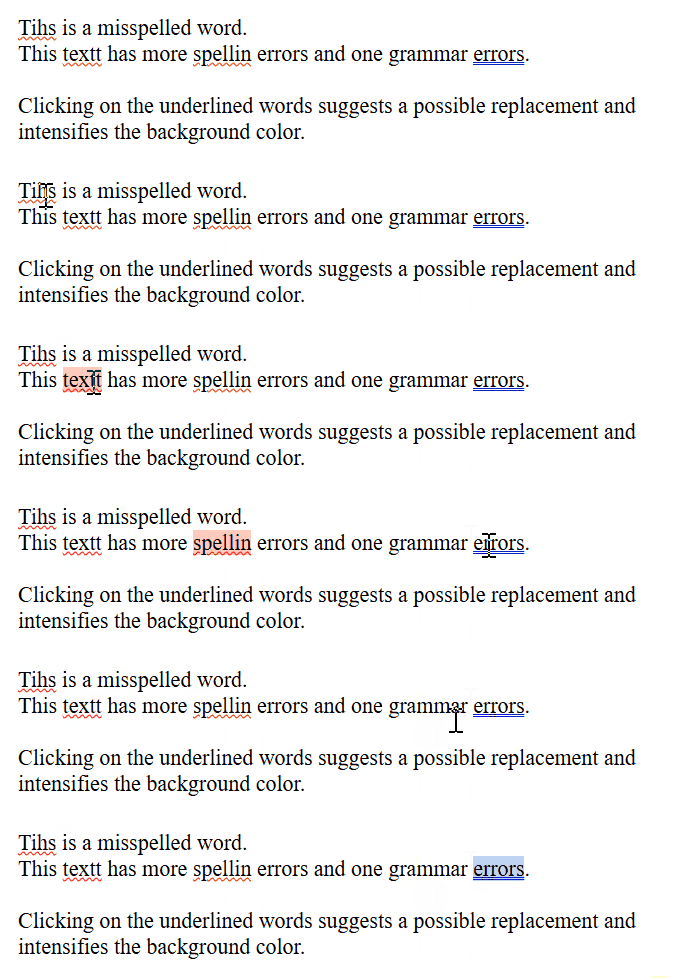
In the Appendix there is a full example of code showing how this could be achieved with custom highlights, but let's focus on the section where the event listeners are added:
function isPointInsideDOMRect(x, y, rect) {
    return (
        x >= rect.left && x <= rect.right &&
        y >= rect.top && y <= rect.bottom
    );
}

function createActiveHighlights(x, y) {
    resetActiveHighlights();
    for (highlight of CSS.highlights.values()) {
        for (highlightAbstractRange of highlight.values()) {
            // Need to create a Range for getClientRects() because it can be a StaticRange.
            let range = new Range();
            range.setStart(highlightAbstractRange.startContainer, highlightAbstractRange.startOffset);
            range.setEnd(highlightAbstractRange.endContainer, highlightAbstractRange.endOffset);
            let rangeIsHit = false;
            for (rect of range.getClientRects()) {
                if (isPointInsideDOMRect(x, y, rect)) {
                    setActiveHighlight(highlight, highlightAbstractRange, x, y);
                    rangeIsHit = true;
                    break;
                }
            }
            if (rangeIsHit) {
                break;
            }
        }
    }
}

document.addEventListener('click', (event) => {
    createActiveHighlights(event.pageX, event.pageY);
});

document.addEventListener('mousemove', (event) => {
    cursorBox.style.display = 'none';
});
Some things to notice:
- There's a loop over all of the registered custom highlights in
CSS.highlights. - There's another loop over all of the highlight's ranges to see if the point
(x,y)is inside one of them. - A
Rangehas to be created for each range of the highlight because they can beStaticRanges, which don't supportgetClientRects(). - There's a loop over all of the
DOMRectsreturned bygetClientRects()for each range. - Determining if a point is inside a
DOMRectneeds some extra computation which was added in a helperisPointInsideDOMRect.
Proposal
The highlightsFromPoint() API aims to provide a robust mechanism for identifying and interacting with custom highlights, making it easier for web developers to implement features like the ones described in the Introduction of this document.
Some considerations about it:
- Multiple Overlapping Highlights: When multiple highlights overlap from different features (e.g., a spell-checker and a find-on-page feature), it's crucial to identify all highlights at a specific point. This ensures that all relevant highlights are accurately identified, enabling web developers to handle overlapping highlights more effectively.
- Performance Optimization: By providing a dedicated API for hit-testing highlights, the method can optimize performance. Instead of relying on more complex and potentially slower implementations to determine which highlights are under a specific point, this method offers a streamlined and efficient way to perform this task, improving overall performance by avoiding significant Javascript overhead computation (refer to the Performance Analysis in the Appendix for more details on an example).
- Shadow DOM Handling: Highlights within shadow DOMs require special handling to maintain encapsulation. The method can be designed to respect shadow DOM boundaries, ensuring highlights inside shadows are managed correctly. This helps maintain the integrity of the shadow DOM while still allowing highlights to be identified and interacted with.
The highlightsFromPoint() method proposed would be part of the CSS.highlights interface. It would return a sequence of highlights at a specified point with their corresponding ranges that are hit, ordered by priority. The returned objects would be dictionaries that contain one highlight and a non-empty sequence of ranges each.
The developer has the possibility to pass in options, which is an optional dictionary where the key maps to an array of ShadowRoot objects. The API can search for and return highlights within the provided shadow DOM. The approach of passing an options parameter of ShadowRoot object is similar to the caretPositionFromPoint() and getHTML() methods.
Customer Problem Example Using highlightsFromPoint
Now going back to the spellcheck example discussed in Customer Problem Example section, let's see how createActiveHighlights could be implemented using the proposed API:
function createActiveHighlights(x, y) {
    resetActiveHighlights();
    for (highlightHitResult of CSS.highlights.highlightsFromPoint(x, y)) {
        setActiveHighlight(highlightHitResult.highlight, highlightHitResult.ranges[0], x, y);
    }
}
This piece of code is significantly smaller and simpler than the solution that was shown in the previous section without highlightsFromPoint. More specifically:
- There's no need to iterate over all the ranges of the highlights registered anymore, now
highlightsFromPointgives us only the highlights and ranges that are under the point(x,y). Note that in this particular example we know that if a highlight is hit, there's only one range that was hit because there's no overlapping ranges in the spellchecker. - There's no need to deal with creating new
Rangesand rectangles anymore because that's handled by the API.
You can refer to a full implementation in the Appendix.
Alternative Solutions
Event-based API
A previous explainer proposed an event-based API to handle interactions with custom Highlights. This has been discussed in the CSSWG too, see this issue for details. The main idea was dispatching events to the Highlights present under the cursor upon user actions. Different approaches were taken into account:
- A separate event is dispatched for each Highlight under the cursor in descending priority order. The default action is to advance to the next Highlight and
preventDefault()can be used to stop this. This might result in firing an arbitrary number of events for a single user action. - Dispatch a single event for the top-priority Highlight, with the event path including other Highlights and then bubbling to the DOM tree. However, pointer events can currently only target elements, so this approach might break other specification assumptions.
- A combination of approaches 1 and 2, dispatching two events per user action: one for Highlights and one for the DOM tree. The Highlight event propagates through overlapping Highlights, and if
preventDefault()wasn't called in that sequence, a new event is fired on the DOM tree.
If we wanted to apply option 3 above to the example of online collaboration described before, instead of adding the event listener to the document, we should add it to the highlights themselves. This could be achieved as follows:
let highlightsHit = false;
for (highlight of highlightToUsername.keys()) {
    highlight.addEventListener('click', (event) => {
        if (!highlightsHit) {
            resetActiveHighlights();
            highlightsHit = true;
        }
        createActiveHighlight(event.currentTarget, event.ranges[0], event.pageX, event.pageY);
    });
}

document.addEventListener('mousemove', (event) => {
    cursorBox.style.display = 'none';
});

document.addEventListener('click', (event) => {
    if (!highlightsHit) {
        // If no Highlights were hit, reset them in case there were active ones from previous clicks.
        resetActiveHighlights();
    }
    else {
        // Reset flag for future events.
        highlightsHit = false;
    }
});
In contrast to the solutions presented before, in createActiveHighlights now we don't have to loop over the highlights affected, but we have to do it beforehand to set all the necessary event listeners. Also notice that we now have to keep track if any Highlights are hit after every click so we know when to reset the old active ones.
The main problem with these mentioned event-based options is that each of them carry significant complexity from a specification point of view. Option 3 described above would be the most suitable one, but the event phases are hard to define. Let's suppose that the user moves the mouse over the Highlight h1 set on element e1, and an event listener was set on h1. The phases should look as follows:
Capture phase e1 pointermove - target:e1 currentTarget:e1
Target phase h1 pointermove - target:e1 currentTarget:h1
Bubbling phase e1 pointermove - target:e1 currentTarget:e1
A workaround is needed here where event.target should stay as the element e1 because pointer events can only target elements, but actually the target was the highlight, which doesn't really follow the definition for event.target.
Furthermore, when currentTarget == target, it should be target phase, this would imply the event phases work in a new way and it could break current site implementations or introduce inconsistencies with current specifications.
We can conclude the highlightsFromPoint() API proposed in this explainer is simpler to implement and specify, it doesn't need these kind of workarounds nor creates these open questions, and still satisfies the use cases adequately.
Promise-based API
Another asynchronous variation for highlightsFromPoint could be returning a Promise, which returns the highlights and their ranges present at the given point upon resolving.
This is some example code for how to implement the online collaboration website with it:
function createActiveHighlights(x, y) {
    let highlightsPromise = CSS.highlights.highlightsFromPoint(event.clientX, event.clientY);
    highlightsPromise.then((highlightHitResults) => {
        resetActiveHighlights();
        for (result of highlightHitResults) {
            setActiveHighlight(result.highlight, result.ranges[0], x, y);
        }
    });
    return highlightsPromise;
}
This approach wouldn't really work because one Promise could resolve after other things take place. For example, let's say the user clicks on a highlighted range and then outside of any highlighted ranges. If the old Promise resolves after the new one, it could incorrectly create active highlights and they would stay there until the user clicks somewhere else. This would be problematic for the developer to fix.
Another disadvantage of this option is that being promise-based would be inconsistent with other similar APIs like elementFromPoint and caretPositionFromPoint, which are synchronous, potentially introducing some developer confusion regards how to handle these functions and how they work.
Making highlightsFromPoint part of DocumentOrShadowRoot
While exploring the implementation of the highlightsFromPoint() API, we considered adding it to the DocumentOrShadowRoot interface. However, we decided against this approach due to the complexities involved in managing shadow DOM encapsulation and to ensure consistency with existing APIs like caretPositionFromPoint() and getHTML(), which face similar encapsulation challenges.
Privacy and Security Considerations
Privacy Considerations
The API is designed to minimize the exposure of user information by only revealing highlights at a specific point. It does not handle personal or sensitive information directly, but developers must ensure that highlights do not contain private data. The API respects shadow DOM boundaries to maintain encapsulation and operates independently of user state, so to not reveal any personal information.
Security Considerations
The API introduces no new security risks.
Relevant Discussions
- [css-highlight-api] Approaches for dispatching highlight pointer events · Issue #7513 · w3c/csswg-drafts (github.com)
- [css-highlight-api] Exposing shadow DOM highlights in highlightsFromPoint() · Issue #7766 · w3c/csswg-drafts (github.com)
- [css-highlight-api] Should highlightsFromPoint also return ranges under the hit point? · Issue #12031 · w3c/csswg-drafts (github.com)
Related issues | Open a new issue
Appendix
highlightsFromPoint IDL Proposed
partial interface HighlightRegistry {
	sequence<HighlightHitResult> highlightsFromPoint(float x, float y, optional HighlightsFromPointOptions options = {});
};

dictionary HighlightHitResult {
	Highlight highlight;
	sequence<AbstractRange> ranges;
};

dictionary HighlightsFromPointOptions {
	sequence<ShadowRoot> shadowRoots = [];
};
Example Code Without highlightsFromPoint
This is the full implementation for the spellcheck example mentioned in Customer Problem Example section. This is one way the code for it could be written nowadays without highlightsFromPoint API.
<!DOCTYPE html>
<html>
<head>
<style>
    div {
        padding: 20px;
        font-size: 22px;
    }
    div::highlight(spellcheck-highlight) {
        text-decoration-color: red;
        text-decoration-style: wavy;
        text-decoration-line: underline;
        text-decoration-thickness: 0.5px;
    }
    div::highlight(active-spellcheck-highlight) {
        background-color: rgba(255, 48, 0, 0.25);
    }
    div::highlight(grammar-highlight) {
        text-decoration-color: blue;
        text-decoration-style: double;
        text-decoration-line: underline;
        text-decoration-thickness: 0.3px;
    }
    div::highlight(active-grammar-highlight) {
        background-color: rgba(0, 85, 204, 0.25);
    }
    #cursorBox {
        position: absolute;
        background-color: white;
        padding: 2px;
        border: 1px solid black;
        display: none;
        font-size: 14px;
    }
</style>
</head>
<body>
<div id="text" contenteditable="true" spellcheck="false">
Tihs is a misspelled word.</br>
This textt has more spellin errors and one grammar errors.</br>
</br>
Clicking on the underlined words suggests a possible replacement and intensifies the background color.</br>
</div>
<div id="cursorBox"></div>
<script>
    let cursorBox = document.getElementById('cursorBox');
    let textNode = document.getElementById('text');
    let spellingRanges = [
        new StaticRange({startContainer: textNode.childNodes[0], startOffset: 1, endContainer: textNode.childNodes[0], endOffset: 5}),
        new StaticRange({startContainer: textNode.childNodes[2], startOffset: 6, endContainer: textNode.childNodes[2], endOffset: 11}),
        new StaticRange({startContainer: textNode.childNodes[2], startOffset: 21, endContainer: textNode.childNodes[2], endOffset: 28})
    ];
    let spellingHighlight = new Highlight(...spellingRanges);
    CSS.highlights.set('spellcheck-highlight', spellingHighlight);
    let grammarRanges = [
        new StaticRange({startContainer: textNode.childNodes[2], startOffset: 52, endContainer: textNode.childNodes[2], endOffset: 58})
    ];
    let grammarHighlight = new Highlight(...grammarRanges);
    CSS.highlights.set('grammar-highlight', grammarHighlight);

    let spellingHighlightActive = new Highlight();
    CSS.highlights.set('active-spellcheck-highlight', spellingHighlightActive);
    let grammarHighlightActive = new Highlight();
    CSS.highlights.set('active-grammar-highlight', grammarHighlightActive);

    let highlightToActiveHighlight = new Map([
        [spellingHighlight, spellingHighlightActive],
        [grammarHighlight, grammarHighlightActive]
    ]);

    let spellcheckerSuggestion = new Map([
        ["Tihs", "This"],
        ["textt", "text"],
        ["spellin", "spelling"],
        ["errors", "error"]
    ]);

    function resetActiveHighlights() {
        spellingHighlightActive.clear();
        grammarHighlightActive.clear();
        cursorBox.style.display = 'none';
        cursorBox.textContent = '';
    }

    function getTextFromAbstractRange(abstractRange) {
        let range = new Range();
        range.setStart(abstractRange.startContainer, abstractRange.startOffset);
        range.setEnd(abstractRange.endContainer, abstractRange.endOffset);
        return range.toString();
    }

    function setActiveHighlight(highlight, range, x, y) {
        let activeHighlight = highlightToActiveHighlight.get(highlight);
        if (activeHighlight == undefined) {
            return;
        }

        activeHighlight.add(range);
        cursorBox.textContent = spellcheckerSuggestion.get(getTextFromAbstractRange(range));
        cursorBox.style.display = 'block';
        cursorBox.style.left = (x + 2) + 'px';
        cursorBox.style.top = (y - cursorBox.getBoundingClientRect().height - 6) + 'px';
    }

    function isPointInsideDOMRect(x, y, rect) {
        return (
            x >= rect.left && x <= rect.right &&
            y >= rect.top && y <= rect.bottom
        );
    }

    function createActiveHighlights(x, y) {
        resetActiveHighlights();
        for (highlight of CSS.highlights.values()) {
            for (highlightAbstractRange of highlight.values()) {
                // Need to create a Range for getClientRects() because it can be a StaticRange.
                let range = new Range();
                range.setStart(highlightAbstractRange.startContainer, highlightAbstractRange.startOffset);
                range.setEnd(highlightAbstractRange.endContainer, highlightAbstractRange.endOffset);
                let rangeIsHit = false;
                for (rect of range.getClientRects()) {
                    if (isPointInsideDOMRect(x, y, rect)) {
                        setActiveHighlight(highlight, highlightAbstractRange, x, y);
                        rangeIsHit = true;
                        break;
                    }
                }
                if (rangeIsHit) {
                    break;
                }
            }
        }
    }

    document.addEventListener('mousemove', (event) => {
        cursorBox.style.display = 'none';
    });

    document.addEventListener('click', (event) => {
        createActiveHighlights(event.pageX, event.pageY);
    });
</script>
</body>
</html>
Example Code Using highlightsFromPoint
This is the full implementation for the spellcheck example mentioned in Customer Problem Example section, using the new highlightsFromPoint API proposed.
<!DOCTYPE html>
<html>
<head>
<style>
    div {
        padding: 20px;
        font-size: 22px;
    }
    div::highlight(spellcheck-highlight) {
        text-decoration-color: red;
        text-decoration-style: wavy;
        text-decoration-line: underline;
        text-decoration-thickness: 0.5px;
    }
    div::highlight(active-spellcheck-highlight) {
        background-color: rgba(255, 48, 0, 0.25);
    }
    div::highlight(grammar-highlight) {
        text-decoration-color: blue;
        text-decoration-style: double;
        text-decoration-line: underline;
        text-decoration-thickness: 0.3px;
    }
    div::highlight(active-grammar-highlight) {
        background-color: rgba(0, 85, 204, 0.25);
    }
    #cursorBox {
        position: absolute;
        background-color: white;
        padding: 2px;
        border: 1px solid black;
        display: none;
        font-size: 14px;
    }
</style>
</head>
<body>
<div id="text" contenteditable="true" spellcheck="false">
Tihs is a misspelled word.</br>
This textt has more spellin errors and one grammar errors.</br>
</br>
Clicking on the underlined words suggests a possible replacement and intensifies the background color.</br>
</div>
<div id="cursorBox"></div>
<script>
    let cursorBox = document.getElementById('cursorBox');
    let textNode = document.getElementById('text');
    let spellingRanges = [
        new StaticRange({startContainer: textNode.childNodes[0], startOffset: 1, endContainer: textNode.childNodes[0], endOffset: 5}),
        new StaticRange({startContainer: textNode.childNodes[2], startOffset: 6, endContainer: textNode.childNodes[2], endOffset: 11}),
        new StaticRange({startContainer: textNode.childNodes[2], startOffset: 21, endContainer: textNode.childNodes[2], endOffset: 28})
    ];
    let spellingHighlight = new Highlight(...spellingRanges);
    CSS.highlights.set('spellcheck-highlight', spellingHighlight);
    let grammarRanges = [
        new StaticRange({startContainer: textNode.childNodes[2], startOffset: 52, endContainer: textNode.childNodes[2], endOffset: 58})
    ];
    let grammarHighlight = new Highlight(...grammarRanges);
    CSS.highlights.set('grammar-highlight', grammarHighlight);

    let spellingHighlightActive = new Highlight();
    CSS.highlights.set('active-spellcheck-highlight', spellingHighlightActive);
    let grammarHighlightActive = new Highlight();
    CSS.highlights.set('active-grammar-highlight', grammarHighlightActive);

    let highlightToActiveHighlight = new Map([
        [spellingHighlight, spellingHighlightActive],
        [grammarHighlight, grammarHighlightActive]
    ]);

    let spellcheckerSuggestion = new Map([
        ["Tihs", "This"],
        ["textt", "text"],
        ["spellin", "spelling"],
        ["errors", "error"]
    ]);

    function resetActiveHighlights() {
        spellingHighlightActive.clear();
        grammarHighlightActive.clear();
        cursorBox.style.display = 'none';
        cursorBox.textContent = '';
    }

    function getTextFromAbstractRange(abstractRange) {
        let range = new Range();
        range.setStart(abstractRange.startContainer, abstractRange.startOffset);
        range.setEnd(abstractRange.endContainer, abstractRange.endOffset);
        return range.toString();
    }

    function setActiveHighlight(highlight, range, x, y) {
        let activeHighlight = highlightToActiveHighlight.get(highlight);
        if (activeHighlight == undefined) {
            return;
        }

        activeHighlight.add(range);
        cursorBox.textContent = spellcheckerSuggestion.get(getTextFromAbstractRange(range));
        cursorBox.style.display = 'block';
        cursorBox.style.left = (x + 2) + 'px';
        cursorBox.style.top = (y - cursorBox.getBoundingClientRect().height - 6) + 'px';
    }

    function createActiveHighlights(x, y) {
        resetActiveHighlights();
        for (highlightHitResult of CSS.highlights.highlightsFromPoint(x, y)) {
            setActiveHighlight(highlightHitResult.highlight, highlightHitResult.ranges[0], x, y);
        }
    }

    document.addEventListener('mousemove', (event) => {
        cursorBox.style.display = 'none';
    });

    document.addEventListener('click', (event) => {
        createActiveHighlights(event.pageX, event.pageY);
    });
</script>
</body>
</html>
Performance Analysis
We compared the performance of the two approaches presented for the spellcheck example analyzed throughout this explainer: with and without the proposed highlightsFromPoint API.
We compared how long it takes for the event listener added for 'click' events to complete in both cases when it happens over a highlighted portion and when it happens over unaffected text. For this, we slightly modified the listener as shown below and also implemented a testPerformance function as follows, adding a hundred extra highlights to stress the test:
let accumulatedTime = 0;
let eventsFired = 0;
document.addEventListener('click', (event) => {
    let start = performance.now();
    createActiveHighlights(event.pageX, event.pageY);
    let duration = performance.now() - start;
    accumulatedTime += duration;
    eventsFired++;
});

function wait(ms) {
    return new Promise(resolve => setTimeout(resolve, ms));
}

async function testPerformance() {
    let mouseclickEvent = new Event('click');
    let highlightRange = new Range();
    highlightRange.setStart(textNode.childNodes[2], 21);
    highlightRange.setEnd(textNode.childNodes[2], 28);
    let rangeRect = highlightRange.getClientRects()[0];

    mouseclickEvent.pageX = rangeRect.left + rangeRect.width/2.0;
    mouseclickEvent.pageY = rangeRect.top + rangeRect.height/2.0;

    // Add more highlights to stress the test.
    for(let i=0; i<100; i++){
        let h = new Highlight(new StaticRange({startContainer: textNode.childNodes[0], startOffset: 1, endContainer: textNode.childNodes[0], endOffset: 5}));
        let name = "highlight-" + i;
        CSS.highlights.set(name, h);
    }

    // First dispatches can be outliers.
    for(let i=0; i<100; i++){
        document.dispatchEvent(mouseclickEvent);
    }
    await wait(100);

    // Measure the time it takes to process a mouseclick event on a highlight.
    accumulatedTime = 0;
    eventsFired = 0;
    for(let i=0; i<1000; i++){
        document.dispatchEvent(mouseclickEvent);
    }
    await wait(1000);
    console.log("Avg time it took to process a mouseclick event on a highlight: "+(accumulatedTime/eventsFired));

    // Now measure the time it takes to process a mouseclick event on the div but outside of highlights.
    mouseclickEvent.pageY = rangeRect.top - 1;
    accumulatedTime = 0;
    eventsFired = 0;
    for(let i=0; i<1000; i++){
        document.dispatchEvent(mouseclickEvent);
    }
    await wait(1000);
    console.log("Avg time it took to process a mouseclick event outside of highlights: "+(accumulatedTime/eventsFired));
}

testPerformance();
After executing both examples, we got the following results showing a ~4.1x improvement on clicking over highlights and a ~3.8x improvement on clicking outside of any highlights when using highlightsFromPoint:
-
Using
highlightsFromPoint:- Average time it took to process a click event over highlights (ms): 0.209
- Average time it took to process a click event outside of highlights (ms): 0.131
-
Not using
highlightsFromPoint:- Average time it took to process a click event over highlights (ms): 0.868
- Average time it took to process a click event outside of highlights (ms): 0.497
When the mouse click event happens outside of the higlights, the performance profiler from developer tools shows that createActiveHighlights takes more time dealing with the Ranges and getting the rectangles compared to the version that uses highlightsFromPoint. And when the event happens on a highlight, the call to highlightsFromPoint takes less time than all the necessary calls to getClientRects that are fired in the version that doesn't use the new API. Both measurements indicate that using the new API gives a performance advantage by getting rid of all the Javascript overhead that the program requires when implementing this use case with the current APIs available.