MSEdgeExplainers
Custom Highlight API Extensions
Authors
- Kevin Babbitt (Microsoft)
Participate
Table of Contents
- Custom Highlight API Extensions
- Authors
- Participate
- Table of Contents
- Introduction
- User-Facing Problem
- User research
- Proposed Approach
- Alternatives considered
::nth-letter()and::nth-word()pseudo-elements- CSS Text Transitions
- Driving staggered highlight fades through JavaScript
- One ::highlight() rule per animation offset
- Extending
AbstractRangewith an inlinestyleproperty - Per-highlight atomic paint groups
- Per-contribution opacity in the existing paint order
- Compositing
coloranimations
- Accessibility, Internationalization, Privacy, and Security Considerations
- References & acknowledgements
Introduction
Many Web experiences apply visual effects to text. AI chat interfaces and online presentation tools have made text entry and exit effects especially prominent, while read-along experiences and editing tools use changing highlights to convey playback or analysis state.
Existing Web primitives can be inefficient for text-level animation effects because they require backing elements. For a per-word animation with a lot of text, hundreds of extra elements might be created for no reason other than to support such an effect.
This explainer proposes three extensions to the CSS Custom Highlight API,
which together allow authors to apply independently timed,
compositor-driven animations to arbitrary text ranges without
introducing additional elements solely to achieve the effect.
Although text animation motivates this proposal, the per-range styling
capability also supports non-animated scenarios such as data-driven
annotations, collaborative selections, syntax highlighting, and other cases
where ranges within one Highlight need minor style variations.
User-Facing Problem
The most common approach for building text-based effects is to segment the text using
a mechanism such as Intl.Segmenter or String.prototype.split(), wrap each
resulting character, word, or other unit in an element such as a <span>, and
apply the effect to each wrapper. This technique introduces several problems:
- Performance: Each wrapper adds cost to the DOM, style calculation, layout, and accessibility trees. For a per-word split in a chat application, a long-running conversation could generate hundreds of these extra wrappers.
- Accessibility: Assistive technology may announce heavily fragmented text differently from an uninterrupted sentence. Authors sometimes compensate by maintaining a separate accessible representation. Or they may remove wrappers as animations complete, which adds to the performance overhead.
- Editing interaction: Presentation-only elements can interfere with text selection, editing, and clipboard operations such as copy and paste.
- Content maintenance: When text changes, authors must preserve or rebuild the generated structure while keeping animation state and application data synchronized with it.
Libraries such as GSAP SplitText and Splitting.js package this pattern and handle many of its authoring details. Because the resulting representation still uses an element for each text unit, it retains similar platform-level costs and tradeoffs.
Libraries such as Pretext provide an alternative for measuring text and laying it out on a canvas. Canvas-based rendering avoids some of the drawbacks of DOM-based solutions but introduces its own drawbacks: the author becomes responsible for supporting text interactions such as selection and providing an accessible representation.
The Custom Highlight API already lets authors identify arbitrary text ranges without changing the document structure. However, highlight styling only supports a limited set of properties and does not allow for animation effects or per-range variants like an inline style on an element. Consequently, the API cannot currently replace element wrappers for these effects.
Goals
- Allow authors to animate and transition paint-only styles on custom highlights using familiar CSS syntax and timing behavior.
- Allow style variations between ranges in one
Highlight, without requiring a separate highlight name and CSS rule for every variation. - Support efficient opacity effects over all of a custom highlight's painted content without making highlights participate in layout.
- Preserve the semantic document structure, text shaping, selection behavior, and accessibility representation of the highlighted content.
Non-goals
- The proposal does not aim to address text-level transform animations. Setting opacity on an element creates a stacking context, but because it does not reposition any content, we can reasonably emulate this behavior in a highlight. Setting a transform on an element establishes a containing block, which influences positioning of descendant elements. It is much harder to define an analogous behavior in a post-layout effect.
- We are leaving the division of text into sub-element units (such as characters, words, or lines) up to the author rather than providing declarative options. Prior research on other solutions for efficient text-level animations surfaced internationalization and generalizability concerns with baking specific splitting algorithms into platform features, so we avoid doing so here.
User research
- A developer who attempted an LLM typing effect with Custom Highlights reported that the lack of animatable highlight properties, including opacity, prevented the approach from working.
- Developers reported using Custom Highlights to follow spoken text and highlight spoken words. An earlier accessibility discussion similarly described highlighting the current word and sentence during speech.
- Editor and highlighter libraries expose mature range-decoration systems. Examples include CodeMirror decorations and Shiki syntax highlighting.
- The State of CSS 2025 typography responses include requests to animate individual letters without creating thousands of spans or splitting text in JavaScript.
- The State of HTML 2024 Custom Highlight results also record interest in syntax highlighting, avoiding extra wrappers, search term highlighting, and richer styling.
Proposed Approach
We propose three enhancements to the Custom Highlight API:
- CSS Animations and Transitions on highlight ranges.
- Per-range styles to allow for minor variations on a given
::highlight()rule. - Opacity support on highlight ranges.
CSS Animations and Transitions
We propose allowing the CSS animation and transition properties to apply to custom highlight pseudo-elements. For example:
@keyframes emphasize {
  from { background-color: transparent; }
  to { background-color: gold; }
}

::highlight(new-annotation) {
  animation: emphasize 300ms ease-out;
  transition: background-color 150ms;
}
Animations and transitions can affect properties that are valid for highlight
pseudo-elements, including the proposed opacity support. Properties that
do not apply to highlights are ignored in keyframes and transition lists.
Animation and transition properties declared on an originating
element apply only to that element; they do not configure effects on its
highlight pseudo-elements. Highlight effects are instead configured through
the highlight cascade, including matching ::highlight() rules, per-range
declarations, and inheritance from corresponding ancestor highlight
pseudo-elements. Custom properties inherited from the originating element can
affect the resolved effect properties.
Effect identity
Each (Highlight registry entry, range, originating element) tuple acts as one
animation or transition target. This follows the existing highlight styling
model, in which each originating element draws its portion of a highlight using
the corresponding highlight pseudo-element style. A range which crosses
several elements can therefore produce effects with different property values,
timing parameters, or both.
Line boxes and paint fragments do not create additional animation targets. If one originating element draws a range in several fragments, those fragments share one animation timeline.
The registry entry is part of the identity because the same Highlight can be
registered under more than one name:
CSS.highlights.set("search-result", results);
CSS.highlights.set("active-result", results);
The two names can match different ::highlight() rules, so they produce
independent animation and transition effects. Removing and re-adding a range
creates a new membership and therefore new animation targets for its
originating elements.
How effects respond when a range boundary moves is an open question.
Because the originating element is part of effect identity, crossing an element
boundary can create or remove an effect target. Initiating an effect only in
that case, however, would make behavior depend on markup boundaries: the same
range expansion could behave differently depending on whether it crosses an
element such as <b>. Possible approaches include treating boundary changes as
non-triggering geometry updates, synchronizing newly created targets with an
existing effect state, or reconsidering the identity model so that distinct
text slices within an originating element can act as effect targets, allowing
all range boundary moves to initiate effects regardless of whether they cross
an element boundary.
Animations
An originating element is eligible for an animation when all of the following are true:
- the range is a member of the
Highlight; and - the
Highlightis registered under a name for which the combined::highlight()and per-range style specifies an animation; and - the range contains content drawn by that originating element.
Changing a live Range's boundary points does not restart animations for
originating elements which remain covered. The behavior for newly covered or
no-longer-covered originating elements is part of the open question described
above.
One possible resolution would synchronize newly created targets with the existing animation state. Under that model:
<p>This is a <b>paragraph</b> with <b>bold</b> words.</p>

<style>
  @keyframes pulse {
    from { background: transparent; }
    to { background: yellow; }
  }
  ::highlight(pulse) {
    animation: pulse 1s infinite alternate;
  }
</style>
<script>
  // Start the pulse animation on the first word of the paragraph.
  const paragraph = document.querySelector("p");
  const firstWord = paragraph.firstChild.textContent.split(" ")[0];
  const range = new Range();
  range.setStart(paragraph.firstChild, 0);
  range.setEnd(paragraph.firstChild, firstWord.length);
  CSS.highlights.set("pulse", new Highlight(range));

  // Later: Extend the pulse animation to the entire paragraph.
  range.selectNodeContents(paragraph);

  // The entire paragraph, including the <b> descendants,
  // would now run the pulse animation on the same timeline.
</script>
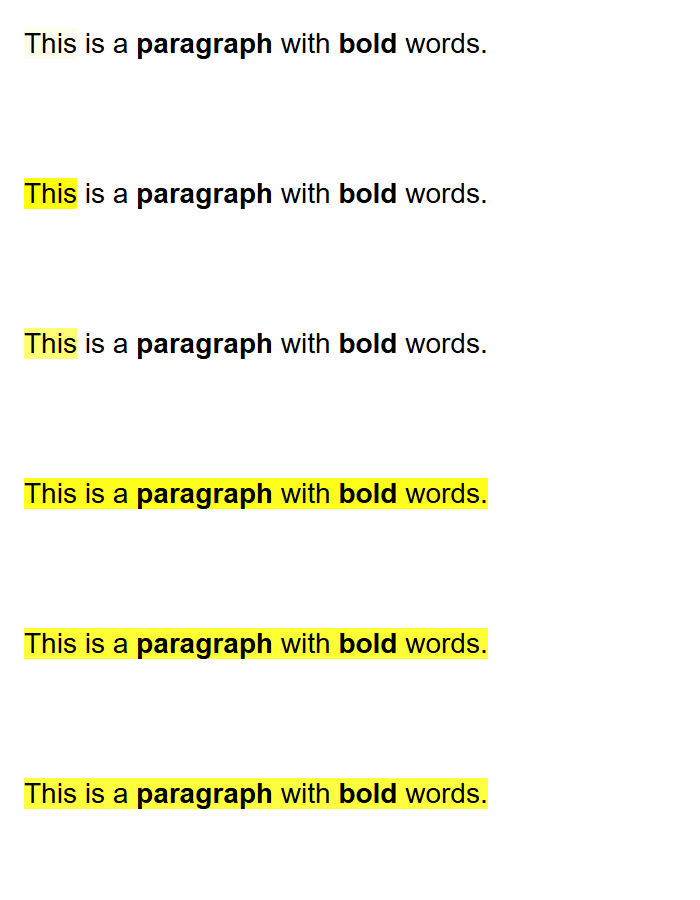
Changes to animation declarations follow the existing CSS Animations update rules. Line boxes and internal paint fragments are not separately exposed to authors.
Transitions
Transitions run when the computed style for one of these per-originating-element
highlight targets changes, whether the change comes from a ::highlight() rule,
a per-range declaration, highlight inheritance, or an originating element's
custom properties.
As with animations and static highlight styling, different originating elements can resolve different property values and timing parameters for the same range. Their transitions run independently. Changing the boundary points of a range does not interrupt transitions for originating elements which remain covered. The behavior for newly covered or no-longer-covered originating elements is part of the open question described above.
Highlight membership changes also participate in transitions. The
not-highlighted transition endpoint uses the originating foreground values, a
transparent background, no highlight-introduced shadow or decoration, and the
initial value of other applicable properties. This makes adding and removing a
range behave similarly to gaining or losing :hover.
When a range is added to a registered Highlight, its before-change style is
the not-highlighted transition endpoint and its after-change style is the
newly computed highlight style. @starting-style can override the starting
values when an effect needs a different entry treatment.
Removing a range from a Highlight deletes it immediately from the set but
triggers an exit transition to the not-highlighted state.
Highlight.clear() starts exit transitions for each member, just as deleting
members individually would.
If a range is re-added while its exit transition is running, the existing CSS transition reversal rules apply. A range which becomes invalid or no longer belongs to the applicable document cancels its animations and transitions without retaining stale paint.
Deleting a registry entry with CSS.highlights.delete() or replacing
its value with a different Highlight using CSS.highlights.set() cancels all
effects associated with the old registry entry, including any in-progress
transitions.
Events
Highlight becomes an EventTarget. Animation and transition events are
dispatched at the Highlight, with the affected AbstractRange exposed on the
event. Because the same range can produce an effect for more than one
originating element, the event also exposes the originating element.
event.pseudoElement identifies the applicable registry name, such as
::highlight(search-result).
Conceptually, the events extend the existing event interfaces as follows:
interface HighlightAnimationEvent : AnimationEvent {
  readonly attribute AbstractRange range;
  readonly attribute Element originatingElement;
};

interface HighlightTransitionEvent : TransitionEvent {
  readonly attribute AbstractRange range;
  readonly attribute Element originatingElement;
};
Events are generated independently for each (Highlight registry entry, range, originating element) target, following the existing CSS Animations and CSS
Transitions event rules. The same range can therefore appear in multiple
events, including events with different elapsed times. Line boxes and paint
fragments do not generate additional events. An author can use the range and
originating element to identify which effect completed without estimating
completion using a timer.
Web Animations API
Highlight effects participate in the Web Animations API. They are returned by
document.getAnimations() and by getAnimations() on their originating
element, following the same rules as effects on other pseudo-elements.
The returned objects are CSSAnimation or CSSTransition objects, as
appropriate.
KeyframeEffect.target is the originating element and
KeyframeEffect.pseudoElement identifies the registry entry, such as
::highlight(search-result).
Because multiple ranges can share both values, KeyframeEffect additionally
exposes the affected range for highlight effects:
partial interface KeyframeEffect {
  readonly attribute AbstractRange? highlightRange;
};
The value is null for effects which do not target a custom highlight range.
Together, target, pseudoElement, and highlightRange identify the
(Highlight registry entry, range, originating element) target.
Highlight also exposes the effects created for its memberships:
partial interface Highlight {
  sequence<Animation> getAnimations(
      optional HighlightGetAnimationsOptions options = {});
};

dictionary HighlightGetAnimationsOptions {
  AbstractRange? range = null;
  Element? originatingElement = null;
  CSSOMString? pseudoElement = null;
};
Omitted or null members do not filter the results. The method continues to
return retained exit transitions after their range has been deleted from the
Highlight, until those transitions finish or are canceled. This gives
authors a way to inspect and control each tuple using the normal Animation
methods. In particular, calling cancel() on a retained exit transition
immediately discards its retained target, style, and paint state. Calling
cancel() also follows the existing Web Animations and CSS event rules,
including dispatching the corresponding cancellation event.
Per-range highlight styles
A staggered text fade requires each successive word to start its animation slightly later than the preceding word. This is technically achievable with custom highlights today, but in ways that are poorly suited to the scenario. Existing techniques are discussed in the "Alternatives Considered" section.
Staggering animation effects that work on a per-element basis can take advantage of each element's inline style to achieve this effect. We propose a capability for highlight ranges that aims for similar flexibility.
The proposed API is:
partial interface Highlight {
  CSSStyleDeclaration? getRangeStyle(AbstractRange range);
};
getRangeStyle(range) returns a mutable declaration block for the membership
of range in that Highlight. It returns null if the exact range object is
not currently a member. The style belongs to the (Highlight, range)
relationship, rather than to the range alone:
const range = new StaticRange(/* ... */);
const searchResults = new Highlight(range);
const diagnostics = new Highlight(range);

searchResults.getRangeStyle(range).backgroundColor = "yellow";
diagnostics.getRangeStyle(range).textDecorationColor = "red";
The same range can therefore participate in different highlights without sharing presentation state.
Repeated calls for a current membership return the same
CSSStyleDeclaration. Changing the boundary points of a live Range preserves
the declaration. Deleting the range or clearing the Highlight detaches it:
the declaration remains inspectable, but further changes have no effect.
Re-adding the range creates a fresh declaration. This lifecycle follows the
identity of entries in Highlight's existing setlike<AbstractRange>.
The declaration accepts custom properties and properties that are valid for highlight pseudo-elements, including animation, transition, and opacity properties added by this proposal.
For example, a per-range style can supply data for minor variants while leaving the general nature of an effect in a shared rule:
highlight.getRangeStyle(range).setProperty("--confidence", confidence);
::highlight(analysis) {
  color: color-mix(in srgb, gray, green calc(var(--confidence) * 100%));
}
Per-range declarations participate in the author cascade after the shared
::highlight() rule, analogous to inline declarations. Invalid properties
are ignored in the same way as they are in a ::highlight() rule. Normal
importance rules still apply, so a !important declaration in a stylesheet can
override a non-!important per-range declaration. The resulting style is
resolved separately for each originating element crossed by the range, since
inheritance, custom properties, and currentColor can differ across those
elements. This includes animation and transition parameters.
If the same Highlight is registered under multiple names, its per-range
declarations are shared, while each name contributes its own
::highlight() rules. Authors who need independent per-name range data can
use separate Highlight objects.
Overlapping ranges with different per-range styles behave like overlapping
ranges belonging to different named custom highlights. Each range's
declaration is first combined with the shared ::highlight() rule to produce
an effective style for that range. Those effective styles are then painted as
separate highlight layers; they are not cascaded or merged into one style for
the overlap.
For example:
const first = new StaticRange(/* ... */);
const second = new StaticRange(/* ... */);
const highlight = new Highlight(first, second);

highlight.getRangeStyle(first).backgroundColor = "yellow";
highlight.getRangeStyle(second).color = "blue";
Where the ranges overlap, the yellow background contributed by first remains
visible, while second, as the higher layer, supplies the winning blue
foreground. This is the same result the author would get by placing first
and second in separately named custom highlights with the corresponding
styles.
The existing custom-highlight stacking order continues to order different
registry entries. Within one Highlight, range set insertion order supplies
the additional ordering: later ranges paint above earlier ranges. Deleting and
re-adding a range moves it to the end of the set and therefore makes it the
highest range layer in that Highlight.
Ranges without distinct per-range styles retain the existing behavior for
members of one Highlight, including treating overlapping ranges as their
union. The additional layers are needed only where per-range styling makes an
observable difference.
Opacity
To take advantage of compositor support in modern engines, staggering animation
effects that work on a per-element basis use the opacity property, rather than
animating color from transparent to the desired value. Using opacity for
these animations also lets authors share keyframes with non-text elements, such
as images, in a single staggered-entry effect that encompasses both.
Trading away compositor support would curtail or even outweigh the performance
benefits of avoiding DOM manipulation in a highlight-based animation. We therefore
propose allowing opacity to apply to highlights.
Unlike opacity on nested elements, opacity values from overlapping highlights do not compound. Instead, one value wins as described below.
Resolving highlight opacity
Each (Highlight registry entry, range, originating element) target resolves
opacity from its corresponding highlight pseudo-element style and any per-range
style. The resulting value applies to the portion of the range painted by that
originating element.
When highlight layers overlap within an originating element, their opacity values do not multiply. Instead, the highest active layer that specifies an opacity value determines the winning opacity. If no active highlight specifies opacity, the resulting highlight opacity value is 1.
For example, where two highlights overlap:
| Lower highlight | Upper highlight | Resulting opacity |
|---|---|---|
opacity: .4 |
opacity: .7 |
.7 |
opacity: .4 |
Opacity omitted | .4 |
opacity: .4 |
opacity: 1 |
1 |
opacity: .4 |
opacity: 0 |
0 |
Applying the winning opacity
The winning opacity applies once to the combined ink for the affected region: foreground text or replaced content, highlight backgrounds and shadows, and originating and highlight decorations. It does not independently fade each highlight's contributions.
For example, an opaque blue glyph over an opaque yellow highlight background at winning opacity .5 is painted as blue over yellow and then faded as a unit. The yellow background does not show through the blue glyph as it would if the foreground and background were faded separately.
The existing foreground painting behavior remains unchanged: the topmost active highlight overlay redraws the text, while lower highlight foregrounds and the originating text are not separately painted. Consequently, a winning opacity of 0 makes the combined ink transparent; it does not reveal another highlight's foreground or the originating text beneath it.
Interaction with element opacity
Highlight opacity does not replace or override opacity on the originating element(s). Opacity effects on originating element(s) continue to apply as usual. The highlighted content resolves its own opacity and is rendered as a unit, but remains subject to opacity on the originating element(s) and ancestors.
For example:
span {
  opacity: .25;
}

span::highlight(example) {
  opacity: .75;
}
The entire span is faded to opacity .25, and on top of that the highlighted range is faded to .75, for a net effective opacity of .25 x .75 = .1875.
Solving staggered text animation
The following example uses Intl.Segmenter to create one range per word,
assigns each range a different animation delay, and animates the highlight's
opacity.
<style>
  @keyframes fade-in {
    from { opacity: 0; }
    to { opacity: 1; }
  }

  ::highlight(response-words) {
    animation: fade-in 600ms ease-in-out both;
  }

  @media (prefers-reduced-motion: reduce) {
    ::highlight(response-words) {
      animation: none;
      opacity: 1;
    }
  }
</style>

<p id="response">Custom highlights can animate text without extra spans.</p>

<script>
  const node = document.querySelector("#response").firstChild;
  const segmenter = new Intl.Segmenter(undefined, {granularity: "word"});

  // Trailing punctuation joins the preceding word, so it fades in with it.
  function splitWords(text) {
    const words = [];
    for (const {index, segment, isWordLike} of segmenter.segment(text)) {
      const last = words.at(-1);
      if (isWordLike) {
        words.push({index, segment});
      } else if (last && segment.trim() &&
                 index == last.index + last.segment.length) {
        last.segment += segment;
      }
    }
    return words;
  }

  const words = splitWords(node.data);

  const ranges = words.map(({index, segment}) => new StaticRange({
    startContainer: node,
    startOffset: index,
    endContainer: node,
    endOffset: index + segment.length,
  }));

  const highlight = new Highlight(...ranges);

  const staggerInterval = 6 /* milliseconds */;
  for (const [index, range] of ranges.entries()) {
    highlight.getRangeStyle(range).animationDelay = `${index * staggerInterval}ms`;
  }

  // Register only after setting the delays, so all animations start together.
  CSS.highlights.set("response-words", highlight);
</script>
The shared ::highlight() rule defines the animation, the per-range
declarations stagger its timing, and using opacity makes the animation
eligible for compositor acceleration.
To append more text dynamically, the application can add ranges to the
already registered Highlight. This continuation of the example receives
complete-word batches, each with its own stagger starting at zero:
function appendResponseText(text) {
  const newNode = document.createTextNode(text);
  node.parentNode.append(newNode);
  const newWords = splitWords(text);

  for (const [index, {index: offset, segment}] of newWords.entries()) {
    const range = new StaticRange({
      startContainer: newNode,
      startOffset: offset,
      endContainer: newNode,
      endOffset: offset + segment.length,
    });
    highlight.add(range);
    highlight.getRangeStyle(range).animationDelay = `${index * staggerInterval}ms`;
  }
}

// Later, when another batch of text arrives:
appendResponseText(" Newly appended words fade in as they arrive.");
Each batch is appended as a new text node, leaving the existing StaticRange
boundaries unchanged. The new ranges and their per-range delays are set
synchronously, before the next style update, so their animations start with
the intended stagger. Adding these ranges does not restart animations for
existing ranges, even though all the words have the same originating <p>.
Previously revealed words remain visible through animation-fill-mode: both,
while each new range gets its own animation timeline. The same
prefers-reduced-motion rule also applies to the newly added ranges.

Solving loading shimmer
<style>
  @keyframes shimmer {
    0%,
    100% {
      color: #999;
    }
    50% {
      color: #333;
    }
  }

  ::highlight(loading-shimmer) {
    color: #999;
    animation: shimmer 1.5s ease-in-out infinite both;
  }

  @media (prefers-reduced-motion: reduce) {
    ::highlight(loading-shimmer) {
      animation: none;
      color: #333;
    }
  }
</style>

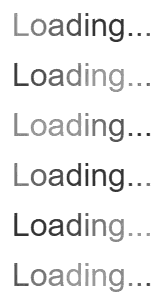
<p id="loading-status">Loading...</p>

<script>
  const node = document.querySelector("#loading-status").firstChild;
  const segmenter = new Intl.Segmenter(undefined, {granularity: "grapheme"});

  const ranges = Array.from(
    segmenter.segment(node.data),
    ({index, segment}) => new StaticRange({
      startContainer: node,
      startOffset: index,
      endContainer: node,
      endOffset: index + segment.length,
    }),
  );

  const highlight = new Highlight(...ranges);
  const shimmerInterval = 100 /* milliseconds */;

  for (const [index, range] of ranges.entries()) {
    highlight.getRangeStyle(range).animationDelay =
        `${index * shimmerInterval}ms`;
  }

  CSS.highlights.set("loading-shimmer", highlight);
</script>
The shared ::highlight() rule defines the looping color animation, while the
per-range declarations offset each grapheme cluster by 100 milliseconds.
Intl.Segmenter keeps user-perceived characters such as combining sequences
together without introducing wrapper elements. Registering the Highlight
after assigning the delays starts all of the animations from the same style
update while preserving their stagger.
Solving spoken-word tracking
Given a set of word ranges, an application can keep
the current word in one Highlight:
::highlight(spoken-word) {
  background-color: gold;
  transition: background-color 120ms ease-out;
}
const spokenWord = new Highlight();
CSS.highlights.set("spoken-word", spokenWord);

function setSpokenWord(range) {
  spokenWord.clear();
  spokenWord.add(range);
}
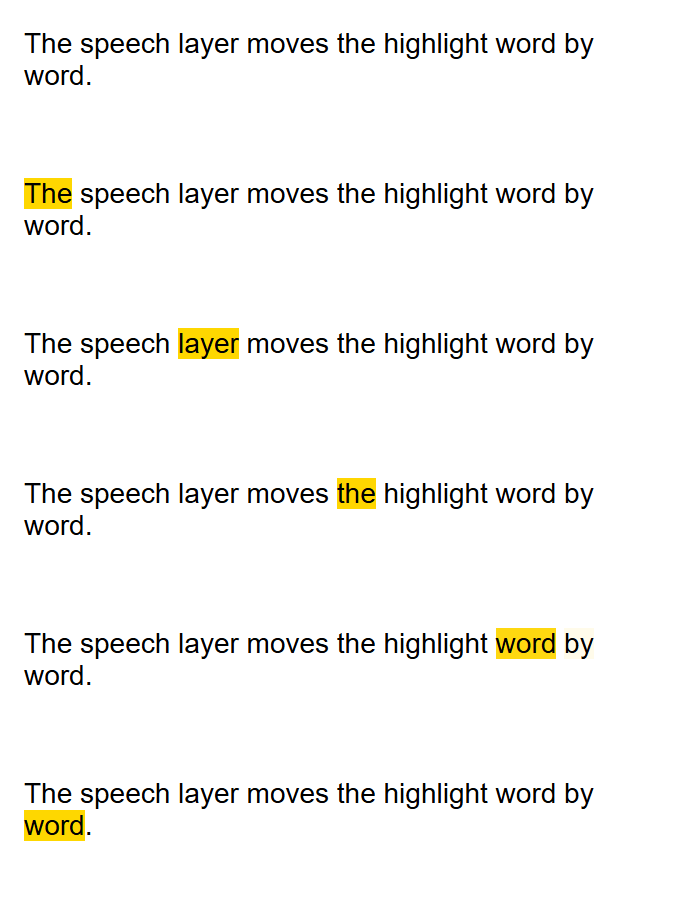
The speech or media layer calls setSpokenWord() as playback advances. When
the range changes, the old word transitions to the not-highlighted state while
the new word transitions into the highlighted state. No timer is needed to
drive intermediate colors, and neither word needs a wrapper element.
The same pattern can use two Highlight objects to track the current word and
current sentence independently.
Solving data-driven range styling
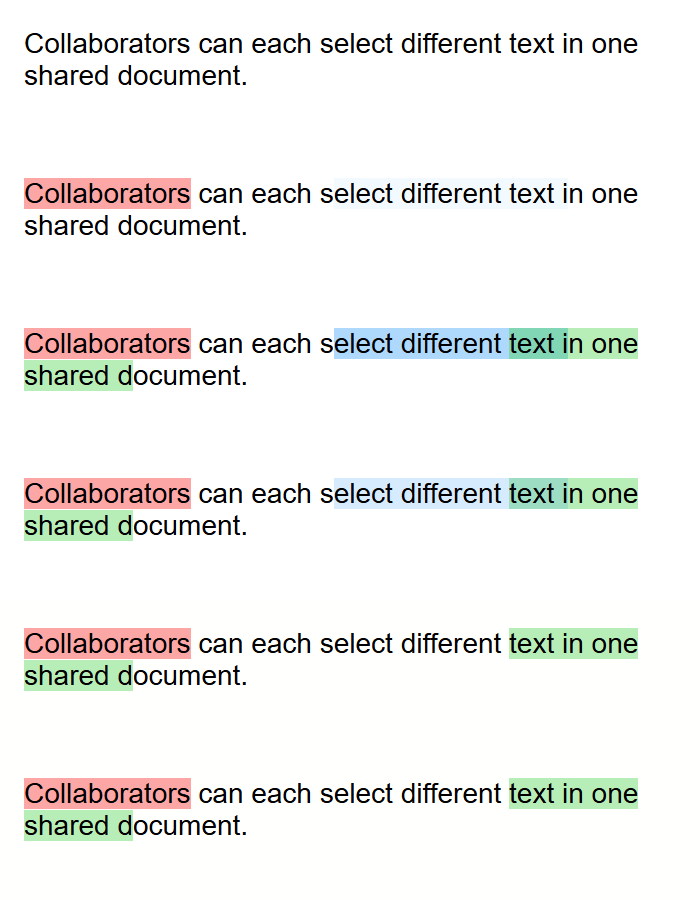
Range-decoration systems commonly receive presentation data from an application model. For example, Lexical's collaborative selection implementation currently generates a highlight name and CSS rule for each collaborator's arbitrary color.
Per-range styles allow one logical Highlight and one shared CSS rule to
represent those selections:
::highlight(remote-selections) {
  background-color:
      color-mix(in srgb, var(--selection-color) 35%, transparent);
  transition: background-color 120ms;
}
const remoteSelections = new Highlight();
CSS.highlights.set("remote-selections", remoteSelections);

function addRemoteSelection(range, color) {
  remoteSelections.add(range);
  remoteSelections.getRangeStyle(range)
      .setProperty("--selection-color", color);
}

function removeRemoteSelection(range) {
  remoteSelections.delete(range);
}
The application supplies only the per-range data. The stylesheet continues to control how the color is presented, including its alpha, transition timing, forced-color behavior, and any future theme-specific adjustments. Syntax highlighters and analysis tools can use the same pattern for token categories, confidence scores, diagnostic severity, or other range-specific values.
Alternatives considered
::nth-letter() and ::nth-word() pseudo-elements
A previous investigation contemplated introducing ::nth-letter()
and ::nth-word() pseudo-element selectors. These selectors have a
long history
of being requested additions to CSS but come with their own
complicating factors.
Pros
- Frees authors from having to think about how to split text.
- Doing text splitting in the engine is faster than manipulating ranges in JavaScript.
- In contrast to Text Transitions, generalizes to non-animation scenarios.
Cons / Reasons for rejection
- Even though UAX-29 gives us a standardized way to split text on letter and word boundaries, it is not clear that this way is sufficiently universal across use cases to bake it into pseudo-elements. For example, there may be differences in how an author wants to handle adjacent whitespace or punctuation depending on whether they are implementing a per-word text entry effect, a read-along effect, or an editor highlight effect. Editing applications might also want to vary their behaviors to emulate native controls on the underlying platform.
- The same scenario may need to split different languages into different text units. For example, a text fade stagger might split English text by word and Japanese text by phrase. Tying the choice of text unit to the selector complicates the CSS that needs to be shipped, especially when languages are mixed on the same page.
- Does not provide a better way to assign per-letter or per-word stagger
intervals than having lots of
::nth-word()rules. Words can cross element boundaries, so these pseudo-elements cannot be made tree-abiding, which rules out the use of CSS counters.
CSS Text Transitions
Another previous proposal contemplated four new CSS properties:
transition-text-interval: <time [0s,∞]>#
transition-text-unit: [ none | character | word | line ]#
animation-text-interval: <time [0s,∞]>#
animation-text-unit: [ none | character | word | line ]#
Pros
- Frees authors from having to think about how to split text.
- Doing text splitting in the engine is faster than manipulating ranges in JavaScript.
- Minimal new API surface.
Cons / Reasons for rejection
- Concerns similar to those for
::nth-letter()and::nth-word()about baking in specific text-splitting algorithms apply to this approach as well. - Does not generalize well beyond the staggered text animation scenario.
- Loses representability of intermediate values.
Driving staggered highlight fades through JavaScript
Instead of assigning per-range delays, authors could run a JavaScript loop. Once every n
milliseconds, where n is the desired stagger interval, the next range would have the desired
highlight (including an animation effect) applied.
Pros
- Reduces the need for new API surface.
Cons / Reasons for rejection
- Stagger animation updates are tied to the main thread event loop. Implementations frequently cap this loop at their own refresh cadence, such as 60 times a second (once every 16.7 ms). This limits the effects authors can achieve; one use case that was examined was written for a stagger interval of once every 6 ms, which could not be faithfully reproduced on a 16.7 ms refresh timer. Competing work on the main thread could also introduce jank.
One ::highlight() rule per animation offset
Instead of assigning per-range delays, authors could specify each successive delay in its
own ::highlight() rule.
Pros
- Reduces the need for new API surface.
Cons / Reasons for rejection
- The number of text units participating in a stagger animation can be arbitrarily long.
Assigning a unique offset per text unit for
ntext units requires maintainingnunique::highlight()rules. There are two ways to do this, neither of which is good:- Ensure a sufficient number of rules are present at the outset, which causes stylesheet bloat; or
- Dynamically generate and add rules via CSSOM, which can cause large style recalculations to occur.
Extending AbstractRange with an inline style property
An alternative API would put the declaration directly on every range:
partial interface AbstractRange {
  [SameObject, PutForwards=cssText]
  readonly attribute CSSStyleDeclaration style;
};
Pros
- Provides a short and familiar
range.styleAPI. - Makes the declaration easy to retain as a live
Rangechanges boundary points. - Defining it on
AbstractRange, rather thanRange, also coversStaticRangeand future range types.
Cons / Reasons for rejection
- A range describes document geometry, not one presentation of that geometry. The same range can be used for editing, extraction, measurement, or several unrelated highlights.
- If one range belongs to two
Highlightobjects, an intrinsic style would force both uses to share declarations. Membership-owned styles let the same range represent, for example, a yellow search result and a red diagnostic. - A style mutation would need to find and invalidate every
HighlightRegistrycontaining everyHighlightwhich contains the range. This creates reverse rendering dependencies on a general DOM geometry object. - The effect of the declaration while the range is not highlighted would be unclear.
- Adding presentation state to the base interface would impose these semantics
on every present and future
AbstractRangesubtype, even when it is never used for highlighting.
Per-highlight atomic paint groups
An alternate model for opacity would collect the contributions from each highlight with opacity < 1 into an atomic paint group. Each group would be painted as a unit, with the groups stacked in custom-highlight order rather than interleaving their backgrounds, shadows, decorations, and foreground. Only the group belonging to the highlight that supplies the winning foreground would include foreground text.
Pros
- Resembles the atomic painting of element stacking contexts.
- Can simplify the assignment of compositor layers.
Cons / Reasons for rejection
- Incompatible with the existing decoration paint order. When one highlight applies a line-through and an overlapping highlight applies text color plus opacity < 1, atomic grouping would paint the line-through underneath the text instead of above it.
Per-contribution opacity in the existing paint order
Another alternate model for opacity retains the existing phase-major paint order: all highlight backgrounds, followed by shadows, underlines, overlines, the winning foreground, and line-throughs. Each highlight's opacity would apply independently to its contributions within those phases.
Pros
- Preserves the existing paint order.
Cons / Reasons for rejection
- Specifying opacity by itself in a highlight rule does nothing, which could be counterintuitive.
For example, solving the staggered text entry use case would require also specifying a
foreground text color. One might consider having
color: currentcolorclaim the text foreground without changing the color, but this also produces counterintuitive results: If the originating element had text with a shadow, the foreground text would be faded, but the shadow would still be painted at full opacity, because the latter was not part of the highlight contribution. - Composited animation can demand many layers in complex cases, which can significantly degrade performance.
Compositing color animations
Pros
- Reuses the existing highlight painting model without introducing atomic groups or changing the paint order of highlight contributions.
Cons / Reasons for rejection
- Only benefits the winning foreground text color. Explicit backgrounds, decorations, shadows, and replaced-content washes would still need to have animations driven on the main thread.
- Does not integrate as cleanly with non-text content that participates in a
staggered fade. An image would still animate using
opacity, requiring separate keyframes for text and non-text units. - On current graphics platforms, compositing
coloris less efficient than compositingopacity. The former requires a native paint worklet in the engine, whereas the latter can be offloaded entirely to the graphics API.
Accessibility, Internationalization, Privacy, and Security Considerations
As with any animation effect, user preferences expressed via prefers-reduced-motion
should be respected.
As with any opacity effect, user contrast preferences expressed through
prefers-contrast or Forced Colors Mode should be respected.
These extensions affect painting and do not alter the DOM or accessibility tree. Range boundaries and animation timing do not add semantics or cause text to be announced. Authors remain responsible for ensuring that information conveyed by a highlight is also available to assistive technology when needed. Compared with presentation-only element wrappers, highlights preserve the accessible representation and native selection behavior of the underlying content.
In contrast to other solutions explored in this space, this approach leaves the decision
of how to segment text in the author's hands. For word-by-word animations or similar effects,
authors are encouraged to use a standards-backed splitting algorithm such as the one
exposed by Intl.Segmenter.
The proposal builds on the existing Custom Highlight API and CSS animation
models. It does not expose document content or ranges that the calling script
could not already access. The new events and Web Animations objects describe
only ranges already supplied to a Highlight, their originating elements, and
the effects applied to them. No additional privacy or security considerations
have been identified.
References & acknowledgements
- CSS Custom Highlight API Level 1
- CSS Pseudo-Elements Level 4: highlight pseudo-elements
- CSS Animations Level 1
- CSS Transitions Level 2
- Web Animations Level 1
Intl.Segmenter
Many thanks for valuable feedback and advice from:
- Dan Clark
- Elika Etemad
- Emilio Cobos Álvarez
- Fernando Fiori
- Greg Whitworth
- Hoch Hochkeppel
- Kurt Catti-Schmidt