MSEdgeExplainers
Web Install API
Authors:
- Diego Gonzalez
- Lia Hiscock, Microsoft
Participate
Status of this Document
This document is a starting point for engaging the community and standards bodies in developing collaborative solutions fit for standardization. As the solutions to problems described in this document progress along the standards-track, we will retain this document as an archive and use this section to keep the community up-to-date with the most current standards venue and content location of future work and discussions.
- This document status: Active
- Expected venue: WebApps WG
- Current version: this document
Table of contents
- Introduction
- Relationship to other proposals
- User-Facing Problem
- Use Cases
- Proposed Approach
- Alternatives considered
- Accessibility, Privacy, and Security
- Stakeholder Feedback
- Security and Privacy Self-Review
- Additional Links
Introduction
The Web Install API provides a way to democratise and decentralise web application acquisition, by enabling "do-it-yourself" end users and developers to have control over the application discovery and distribution process. It provides the tools needed to allow a web site to install a web app. This means end users have the option to more easily discover new applications and experiences that they can acquire with reduced friction.
Relationship to other proposals
This document is the main explainer for web app installation initiated by a website. It defines:
- The
navigator.install()JavaScript entry point. - The shared install algorithm used by every entry point: manifest fetching, parsing, and validation; user activation, sandbox, and cross-origin gates; the consent UI contract; the error taxonomy returned to callers.
A second, declarative entry point is incubating in parallel:
<install>element (WICG) -- a user-agent-styled button that invokes the same install algorithm defined here. It implements the same permission element specification as<geolocation>and<usermedia>.- Readers working on the
<install>element should treat this document as the normative source for backend behavior.
User-Facing Problem
Think about all the websites you use regularly - email, online shopping, social media, streaming sites, etc. For most users, this requires launching a browser and clicking or typing to get to those sites every time. Web applications enable developers to provide native, "app-like" experiences to end users while building on the trust set by their browser. However, for end users there's no standard, cross-platform way to acquire web applications. The process of distributing and installing web apps is both fragmented and limited:
- Each browser has different, often hidden, entry points for installation (address bar icons, menu items, prompts). Users may not understand what the icon/prompt in the browser's address bar does, or how to deep search several layers of browser UX to add the app to their devices.
- Users may not know that a web app exists for the site they're visiting, for a related origin they're reading about, or that "installation" is even possible on the web -- and many users don't use app stores to discover new app experiences.
- Developers have no standard declarative mechanism to present an install action to users.
- Cross-origin installation (e.g. an app catalog installing apps from other sites) has no built-in web platform support.
Goals
- Enable a site to install a web app identified by its manifest URL, subject to user consent.
- Extend the functionality of beforeinstallprompt, which cannot install content other than the current loaded web application.
- Keep the consent UI clearly attributable: the user sees which site is asking and which app is being installed.
- Avoid creating a cross-origin probing surface: the calling site should learn as little as possible about install state, manifest contents, or app identity.
- Enable user agents to suppress installation-prompt spam.
Non-goals
- Define what "installation" means. This varies by platform and browser.
- Silent or unattended installation. User consent is always required.
- Installing arbitrary web content that is not an app. The target must have a manifest file. See historical context
- Installing native apps, browser extensions, or other non-PWA artifacts.
- Reporting install state of arbitrary apps back to the caller.
Use cases
Install me! (Same origin install)
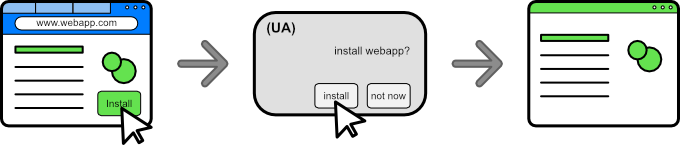
A site can ergonomically trigger the user agent's installation flow, eliminating the need to subscribe to events, or try and direct users through potentially several layers of browser UX to discover the installation entry point on their own.
This is the simplest case -- no parameters are needed:
navigator.install();
Suite of web apps
A family of software applications -- productivity or photography suite, for example -- where each application is a separate web app. The developer can offer installation of any sibling app from the suite's home page, without redirecting users to platform-specific stores.
navigator.install({
  manifest: "https://suite.example/mail/manifest.json"
});
navigator.install({
  manifest: "https://suite.example/calendar/manifest.json"
});
navigator.install({
  manifest: "https://suite.example/tasks/manifest.json"
});
Search and discovery surfaces
A search engine or content site can offer a frictionless way to install an app that a user is searching for, surfacing app candidates the user might not otherwise have known existed.
App directories and online catalogs
A site whose purpose is to list and recommend web apps can offer one-click install for the apps it catalogs, enabling cross-device, cross-platform app directories that don't depend on any single store.
navigator.install({
  manifest: "https://music.youtube.com/manifest.webmanifest",
  manifestId: "https://music.youtube.com/?source=pwa",
});
Proposed Approach
The solution is a promise-based extension of the navigator interface that is simple and ergonomic for developers. A developer calls
navigator.install({ manifest: <url> [, manifestId: <url>] }).
The developer may omit manifestId if and only if the JSON at manifest
contains an id.
As an added convenience, the developer may omit the dictionary object entirely, in which case the currently loaded page's manifest is targeted for install.
The API's promise will:
- Resolve if the installation was completed.
- The promise resolves with an empty
WebInstallResultdictionary for future-proofing.
- The promise resolves with an empty
- Be rejected if the installation did not complete. It will reject with a
DOMExceptionvalue of:AbortError: The user aborted the installation flow.DataError: There was a problem with the data provided. Notable failures include:- invalid
manifestURL, failure to fetch the manifest, malformed manifest file, etc. - the developer omitted the
manifestIdparameter when there was none declared in the manifest file - the developer provided a
manifestIdparameter, but it did not match the one computed by the browser.
- invalid
- See Privacy section
for the complete list of
DOMExceptionrejection codes.
Sample code
1. Install me! (No argument signature)
The developer can offer installation of their own site (ie. the currently loaded page) with minimal JavaScript:
const button = document.querySelector('#install');
button.addEventListener('click', async () => {
    await navigator.install();
});
Reminder! Use of this signature requires you to add an
idfield to your site's manifest.json.
2. Suite of web apps. (Dictionary signature)
The developer can offer installation of a different site (that may or may not
contain an id):
const button = document.querySelector('#install');
button.addEventListener('click', async () => {
  try {
    await navigator.install({
      // If relative, URLs resolve against the currently loaded document.
      manifest: 'https://foo.com/manifest.json',
      manifestId: 'https://foo.com/home',
    });
    // Success: promise resolved!
  } catch (err) {
    if (err.name === 'DataError' || err.name === 'TypeError') {
      // Action needed: illegal/invalid parameters; invalid
      // manifest data; etc.
    } else if (err.name === 'AbortError') {
      // User exited the installation flow. No action needed.
    } else {
      // Installation failed for an unexpected reason. Notify
      // the user, or ask if they want to try again?
      ShowRecoveryUX();
    }
  }
});
A note on manifest id
According to the manifest spec,
if there is no id member present, the computed string resolves to that of the
start_url.
We acknowledge that only around 4% (as of 2024) of web apps have defined ids
in their manifest. We also know that ids are a critical part of
avoiding situations of multiple same applications with no path to being
updated -- if the developer ever changes their start_url without an id
declared, their app appears to UAs as a distinct, new application, and existing
installs are orphaned.
For apps that have an id defined in their manifest, the id may be
omitted from the API call. For apps that do not define the id field, the
API caller must include the expected, computed id*.
*The computed id is easily accessible in the 'Application' tab of Developer Tools in Chromium-based browsers.
Steps to install the app - no-argument signature
install()is called.- If it has transient user activation, continue. Else reject with
NotAllowedError. - If the frame is not sandboxed, and is not a cross-origin subframe,
continue. Else reject with
InvalidStateError. - If the currently loaded document links to a manifest file, continue. Else
reject with
DataError. - If the manifest file has an
idfield defined, continue. Else reject withDataError. - UA presents confirmation UX with appropriate security-sensitive fields. If
the user accepts, continue. Else reject with
AbortError. - Promise resolves.
Note: if the application is already installed, the UA can choose to display UX to launch the application. The UA should follow the same error behavior, resolving the promise if the user accepts the launch, and rejecting with
AbortErrorotherwise.
Steps to install the app - dictionary signature
manifest only
install({manifest: <url>})is called.- If it has transient user activation, continue. Else reject with
NotAllowedError. - If the frame is not sandboxed, or a cross-origin subframe, continue.
Else reject with
InvalidStateError. - If
<url>is a valid URL, continue. Else reject withTypeError. - If
<url>is cross-origin with the current document, the UA asks for permission to install apps from other origins (if not previously granted). If permission is granted, continue. Else reject withAbortError. - UA fetches the manifest at
<url>with credentials mode"omit"(no cookies sent). If the fetch succeeds, continue. Else reject withDataError. - If the fetched manifest contains an
id, continue. Else reject withDataError. - UA presents confirmation UX with appropriate security-sensitive fields. If
the user accepts, continue. Else reject with
AbortError. - Promise resolves.
manifest and manifestId
install({manifest: <url>, manifestId: <manifest_id>})is called.- If it has transient user activation, continue. Else reject with
NotAllowedError. - If the frame is not sandboxed, or a cross-origin subframe, continue.
Else reject with
InvalidStateError. - If
<url>is a valid URL, continue. Else reject withTypeError. - If
<url>is cross-origin with the current document, the UA asks for permission to install apps from other origins (if not previously granted). If permission is granted, continue. Else reject withAbortError. - UA fetches the manifest at
<url>with credentials mode"omit"(no cookies sent). If the fetch succeeds, continue. Else reject withDataError. - UA determines the computed/processed id of the manifest -- if it matches
<manifest_id>, continue. Else reject withDataError. - UA presents confirmation UX with appropriate security sensitive fields. If
the user accepts, continue. Else reject with
AbortError. - Promise resolves.
Alternatives considered
Install by install_url
We publicly trialed a version of the API that accepted a document URL instead of manifest URL. The target document was fetched and loaded in the background, and its linked manifest was retrieved before proceeding with the same installation steps.
- Pros:
- Leveraged the existing document-based trust path: starting from a loaded page let the browser rely on the page-to-manifest relationship the web platform already understands, including common deployments where the manifest is hosted separately from the app document.
- Service worker registration - service workers are registered on page load. They provide offline resource caching and app-like functionality, such as online install, offline launch.
- Cons:
- Privacy leak - fetching the target document discloses cross-origin request context and credential state (including cookie-related signals).
- Performance - loading a full document when we're ultimately interested in the manifest is a heavyweight operation that increases the potential attack surface.
- Document urls are brittle - many sites utilize redirects for things such as authentication or localized URLs, making it difficult to provide one single install_url. (Direct feedback from public trials).
Declarative install with <a>
Allow a new target type of _install to the HTML anchor tag. It could also
use the rel
attribute to hint to the UA that the url in the link should be installed.
<a href="https://airhorner.com" target="_install">honk</a>
<a href="https://airhorner.com" rel="install">honk</a>
Pros:
- Platform fallback to navigate to the content automatically.
- Does not need JavaScript.
Cons:
- Takes the user out of the current context, providing no alternative if the use case benefits from them staying in context.
- Limits the amount of information a developer can act upon that the promise provides, such as if the installation was successful.
- Developers can't easily detect UA declarative support in order to be able to tailor their UX to different situations.
- More complex combinations for the UA to take into account: additional attributes
that act on a link HTML tag (
a) like the target mean there is an increased set of scenarios that might have unintended consequences for end users. For example, how does a target of_ topdiffer from_blank? While we could look at ignoring thetargetattribute if arelattribute is present, the idea is to use acquisition mechanisms that are already present in UAs.
While there is certainly merit to an <a> based approach, we believe an element
<install> offers UAs better control over the presentation and end to end UX.
See <install> proposal.
Open Questions
Service worker registration
When installation is initiated from a manifest URL, the target app's page will not be loaded before install completes. That can delay service worker registration and prevent online install/offline launch scenarios.
Current decision: Deferred. UAs can mitigate this in the meantime by automatically launching the app after installation.
CDN-served manifests and origin trust
Some apps serve manifests from CDNs on a different origin than the app's
start_url. Should this API require the manifest URL to be same-origin
with start_url, or can cross-origin manifests be supported with
additional trust checks that do not involve loading the entire document?
Current decision: manifest URL must be same origin with start_url.
Relative URL resolution
Related to the above. Manifests may contain relative URLs, which are specified to resolve against the loaded document's URL. However, this proposal does not load the target document, so how should relative manifest URLs be resolved?
Current decision: resolve relative URLs using the original manifest URL,
since cross-origin manifest URLs are currently not supported.
Versioned manifest URLs and stale links
Apps that version manifest filenames (for example, manifest-1.0.2.json) can
leave previously published navigator.install calls pointing at stale URLs.
Should the platform define guidance or a stable convention (for example,
indirection via a fixed URL) to reduce breakage?
Current decision: Rely on DataError to inform callers of broken URLs and await developer feedback.
Accessibility, Privacy, and Security Considerations
Accessibility
The install consent UI is browser-rendered, using existing accessible PWA install surfaces.
What information is exposed to the caller (especially for cross-origin installs)
Generally, we want to expose as little information as possible, while still maintaining usability for developers. Currently, that looks like -
- Promise resolves on successful install
- This is one of the main requirements to allow functional web app stores
- Promise rejects with
DataErrorfor any data/manifest-related failures.- This is critical for developer usability given the manifest id prerequisites for using the API.
- Promise rejects with
AbortErrorfor user cancellations.- This was explicitly requested by multiple developers during public trials so they can know whether to show retry UX.
Additionally, the promise can also reject with
TypeError: arguments were invalid; incorrect type; incorrect URL scheme; etcNotFoundError: missing documentNotAllowedError: missing user activationInvalidStateError: invoked outside the main frame, or invalid script state
See #1341.
Side-channel considerations: Regardless of which option is chosen, the calling origin can partially infer outcomes through observable side channels. Focus/blur events reveal whether a secondary dialog was shown. These side channels exist independently of the promise result and limit the privacy benefit of withholding explicit results.
Same-origin policy
The content installed using the navigator.install does not inherit or auto-grant permissions from the installation origin. This API does not break the same-origin security model of the web. Every different domain has its own set of independent permissions bound to their specific origin.
Cross-origin resource fetching
When fetching the manifest and any of its resources, UAs must ensure that no cross-origin cookies or identifiable information are leaked to the target server.
Private / Incognito contexts
This feature is not available in private browsing or off-the-record profiles, as web apps are not generally installable there. UAs must ensure failure signaling does not create a reliable private-mode detection channel (for example, not failing immediately in private modes).
Preventing installation prompt spamming
- Transient user activation is required to invoke this API.
- The API is blocked in all sandboxed contexts (documents and iframes).
- The API is blocked in cross-origin subframes.
- The cross-origin installation capabilities are gated behind a user-facing permission. For example, if a user declines the permission for evil.com, evil.com will be blocked from invoking navigator.install.
New "installation" permission for origins
A new "installation" permission is required if manifest is from a different
origin than the requesting site. This permission is associated with the
requesting origin.
This results in a new integration with the Permissions API.
The install API will make available the "web-app-installation"
PermissionDescriptor
as a new powerful feature.
This would make it possible to know programmatically if install would be blocked.
/* example of querying for the state of an installation permission using the Permission API  */

const { state } = await navigator.permissions.query({
  name: "web-app-installation"
});
switch (state) {
  case "granted":
  case "prompt":
    navigator.install('https://productivitysuite.com');
  case "denied":
    // navigator.install will always abort. Developers
    // can hide the install UI, or offer a redirect to
    // the desired app's page.
    break;
}
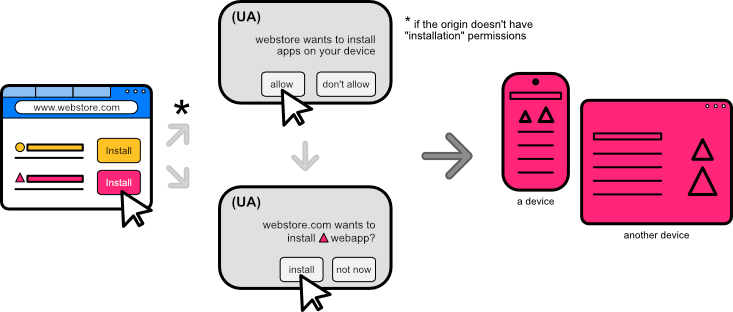
Note: For background documents, a permission prompt will appear for origins that do not have the capability to install apps. Even if the installation is of a "background document" in the same origin, for consistency the origin must have the permission to install apps. The only cases that will not prompt for the permission are the installation of the "current document" or a "background document" in an origin that already has installation permissions.
Example:
The app located in https://productivitysuite.com displays in its homepage 3 buttons that aim to install 3 different apps (notice all apps are in the same origin):
- the text processor located at
https://productivitysuite.com/text - the presentation app located at
https://productivitysuite.com/slides - the spreadsheet located at
https://productivitysuite.com/spreadsheet
The end user goes to the homepage in the https://productivitysuite.com's origin and clicks on the button to install the presentation application. As this is a background document (not the current document the user is interacting with) and the origin does not have permission to install apps, a permission prompt will appear. If this permission is granted for the origin, it can now install apps. After this permission prompt, the second prompt where the user confirms the installation appears.
The end user then tries to install the text processor, and since the origin has been granted the permission, then the UA will skip the permission prompt and skip directly to confirm installation with a prompt indicating that "productivity suite wants to install text processor". The installation permission is bound to an origin.
If the user were to deny the permission to install for the origin, they could browse to the app itself and once there, they could install the application. In this case, there wouldn't be any permission prompt required as this would now be a current document installation.
Further potential abuse mitigations
- UAs may restrict API usage to installed contexts - that is, only installed apps can install other apps.
- UAs may implement a cooldown period, throttle, etc on the amount of installation requests allowed from a given webpage.
Stakeholder Feedback
- Developers: Positive.
- W3C TAG Review: PENDING
- Browser Standards Positions:
- Chromium: Supportive/Implementing
- Mozilla: mozilla/standards-positions#1179
- WebKit: WebKit/standards-positions#463
Additional Links
- Archived earlier design: install-url-version/explainer.md
- Origin Trial demo: MicrosoftEdge/Demos
- Chrome Status
- TAG review (prior design)